Robot Mop Leaving Streaks: Guidance by Model
Short answer
Samsung links Jetbot Mop marks to floor material and water amount; eufy recommends Low water flow for dark-colored floors on the Omni E35. As a precaution, stop if a mark looks scratched or the finish is damaged.
Short answer: documented guidance by model
These model-specific sources cover liquids, water settings, pad care, and floor materials. Samsung’s Jetbot Mop article says streaks or circular marks may appear depending on floor material and water amount, and that they fade over time. The Roborock S7 manual says a dirty VibraRise mop cloth affects mopping performance.
The table and brand sections identify the model or app context attached to each source.
Marks described for the Samsung Jetbot Mop
Samsung’s Jetbot Mop article links circular marks and streaks to floor material and water amount and says they fade over time.
As a precaution, avoid extra wet passes on a potentially damaged finish, stop if a mark looks scratched into the surface, and check exposed wheels for trapped debris if a line follows their path.
Liquid and tank: what each manual approves
For the Roomba Combo 10 Max, iRobot’s cleanser page lists StayClean Mopping Concentrate, Braava Jet Fresh Liquid Floor Cleaner and plain water as approved. It says Bona hardwood and hard-surface cleaners are not approved for that model, because they produce so much suds that water may spill onto the floor. The same page covers the Roomba 100/1000 Series Combo, with Braava Jet Fresh or plain water as the approved options, and says hot water and vinegar mixes are not allowed. iRobot warns that unauthorized solutions may cause corrosion and malfunction.
The Roborock S7 manual says cleaning fluids or disinfectants may corrode the tank, and asks for cold or room-temperature water. The Roborock S5 Max manual says no cleaning fluid or disinfectant goes in the tank, and warns against hot water. The eufy RoboVac L70 Hybrid page says to fill the tank with cold tap water and add no hot water or cleaning solution. The DEEBOT DDX57 manual asks for the official ECOVACS cleaning solution to avoid potential machine malfunctions. Samsung’s Jetbot Mop article asks for clean water in the water supply kits and clean pads before each use.
As a precaution, if a product is not on your model’s approved list, get the maker’s cleaning instructions before the next run. iRobot’s page also warns that adding vinegar causes corrosion and voids the warranty.
Water setting and pad moisture
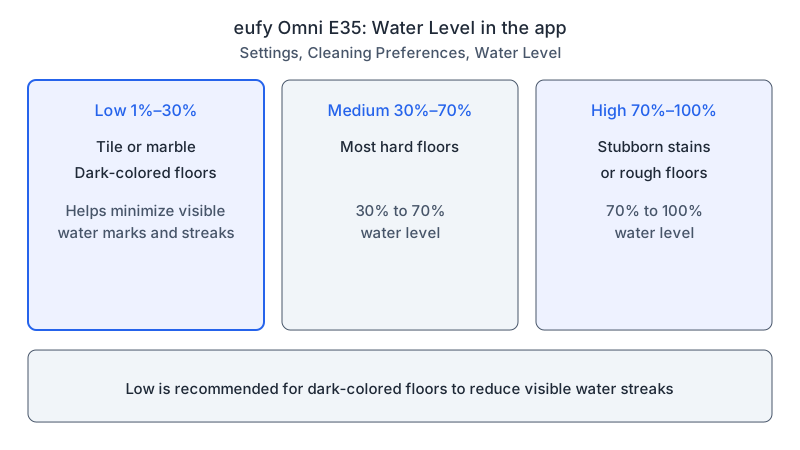
The eufy Omni E35 page describes three water levels, set under Settings, Cleaning Preferences, Water Level in the app: Low (1%-30%), Medium (30%-70%) and High (70%-100%). It recommends Low for tile, marble and dark-colored floors, because Low helps minimize visible water marks and streaks. It recommends High for stubborn stains or rough floors. On the RoboVac L70 Hybrid, the Water Release Setting sits under Mop Mode Settings in the EufyHome app. That page says mop mode is meant for clean hard floors without carpets or stubborn stains, and that no-mop zones keep the robot off carpeted areas.
ECOVACS’s wet and dry pad FAQ, on its US help site, says a too-dry pad calls for high mopping water flow and the deep washing interval, while a too-wet pad calls for low or medium flow and the daily or high-efficiency interval. These settings sit under Smart Cleaning in the ECOVACS HOME app. The DEEBOT DDX57 manual adds that washable mops are replaced every one to two months, and that the robot recognizes floor types and lifts its mops automatically on carpets.
Roborock’s pad guidance differs by model. The S7 manual says to wash the VibraRise mop cloth after each use. For no or little water during mopping, it describes checking the tank and setting scrub intensity in the app, or checking the cloth and mount installation. The S5 Max manual says that when mopping immediately, the cloth should be dampened and squeezed dry before it goes on the bracket. It recommends cleaning the cloth after 60 minutes of mopping and replacing it every three to six months.
What changes by model
| Brand and model | What its source documents | Source |
|---|---|---|
| iRobot Roomba Combo 10 Max | StayClean concentrate, Braava Jet Fresh and plain water are approved; Bona hardwood and hard-surface cleaners are not approved because of foam | iRobot approved solutions |
| iRobot Roomba 100/1000 Series Combo | Braava Jet Fresh: add 2.5 caps to the empty tank (3 caps with an AutoEmpty Dock), then fill with water; plain water is also approved; hot water and vinegar mixes are prohibited | iRobot approved solutions |
| Roborock S7 | Water in the tank, with cleaning fluids and disinfectants named as corrosion risks; wash the VibraRise mop cloth after each use | Roborock S7 manual |
| Roborock S5 Max | No cleaning fluid or disinfectant in the tank; app water-flow control; clean the cloth after 60 minutes of mopping | Roborock S5 Max manual |
| eufy Omni E35 | Low (1%-30%), Medium (30%-70%) and High (70%-100%); Low for dark-colored floors to reduce visible streaks | eufy Omni E35 water flow |
| eufy RoboVac L70 Hybrid | Cold tap water, with no hot water or cleaning solution; Water Release Setting under Mop Mode Settings; no-mop zones for carpet | eufy L70 Hybrid mopping |
| ECOVACS DEEBOT DDX57 | Official ECOVACS cleaning solution; washable mops replaced every one to two months; mops lift automatically on carpet | DEEBOT DDX57 manual |
| ECOVACS HOME app, Smart Cleaning | Too dry: high water flow and deep washing interval; too wet: low or medium flow and daily or high-efficiency washing | ECOVACS too dry or wet |
| Samsung Jetbot Mop | Streaks or circular marks depend on floor material and water amount and fade over time; clean water in the supply kits; clean pads before use | Samsung Jetbot Mop |
iRobot
For the Roomba Combo 10 Max, the rule concerns foam: the page lists StayClean concentrate and Braava Jet Fresh as approved, and Bona hardwood and hard-surface cleaners as not approved. The same page gives the Roomba 100/1000 Series Combo its approved options, Braava Jet Fresh or plain water.
Roborock
The S7 manual says a dirty VibraRise mop cloth affects mopping performance and names the official VibraRise cloth for this product. The S5 Max manual recommends cleaning its cloth after 60 minutes of mopping and replacing it every three to six months, to keep cleaning quality.
eufy
The Omni E35 has Low, Medium and High water levels, and its page recommends Low for dark-colored floors. The L70 Hybrid takes cold tap water, with no hot water or cleaning solution, and sets its water amount through the Water Release Setting.
ECOVACS
The DEEBOT DDX57 manual (model DDX57 with station CH2453B) asks owners to use the official ECOVACS cleaning solution and lists washable mops at one to two months. The FAQ covers the ECOVACS HOME app, Smart Cleaning, and its too-dry and too-wet settings apply under that group label.
Samsung
The Jetbot Mop article applies to the Jetbot Mop as named on the page. It says the robot suits hardwood and tile, and that streaks or circular marks depend on floor material and water amount.
Questions readers ask
Which liquids do the cited models approve? As a precaution, confirm the approved liquid for your exact model before filling its tank. For the Roomba Combo 10 Max, iRobot lists StayClean concentrate, Braava Jet Fresh and plain water. The Roborock S7 and S5 Max manuals name cleaning fluid and disinfectant as corrosion risks for the tank, and the eufy L70 Hybrid page asks for cold tap water and no cleaning solution.
What water levels does eufy recommend for the Omni E35? For the Omni E35, eufy’s page recommends Low for tile, marble and dark-colored floors, Medium for most hard floors, and High for stubborn stains or rough floors. As a precaution, match the level to the floor described for your own model.
What precautions apply to suspected floor damage? As a precaution, stop if a mark looks scratched into the surface or the finish is damaged, and ask the floor manufacturer about further cleaning. Samsung’s description of fading marks concerns the Jetbot Mop’s water use and floor materials.
Limits of a streak-based diagnosis
As a precaution, record the floor type, the exact liquid and its concentration, the pad’s part number, and photographs of the dry pattern before contacting support.
Related guides cover robot pickup problems, water puddles, pad problems, and robot mop troubleshooting.
Not sure which guide fits? Use the symptom checker
Checked against
Models checked: Roomba Combo 10 Max; Roomba 100/1000 Series Combo; Roborock S7; Roborock S5 Max; eufy Omni E35; eufy RoboVac L70 Hybrid; ECOVACS DEEBOT DDX57; ECOVACS HOME app, Smart Cleaning; Samsung Jetbot Mop. These are document checks, not hands-on tests.
- iRobot approved cleaning solutions, North America (support; accessed )
- Roborock S7 Robotic Vacuum Cleaner User Manual (manual; accessed )
- Roborock Robot Vacuum Cleaner S5 Max User Manual (manual; accessed )
- How to Adjust the Suction Power, Water Flow, and Cleaning Schedule for the Omni E35 in the App (support; accessed )
- How do I mop the floor using my eufy RoboVac L70 Hybrid (support; accessed )
- The mopping pad is too dry or too wet for mopping (support; accessed )
- ECOVACS DEEBOT DDX57 Instruction Manual (manual; accessed )
- Clean with your Jetbot Mop (support; accessed )