Robot Vacuum Not Detecting Carpet? Check Boost and Sensors
Short answer
On eufy E25 and E28, check BoostIQ and Carpet Cleaning Mode, then inspect the ultrasonic sensor for dirt. On Samsung BESPOKE Jet Bot AI+ Australian models, automatic carpet suction increases require Smart mode. For an S1 Pro roller mop that rises on non-carpeted floors, or E25/E28 carpet zones missing from the map, use the matching checks below.
Carpet not detected: match the check to your model
-
Check 1
Does your Roborock S7 show Error 28?
Yes
Move the robot onto the floor and retry, as the S7 manual directs.
No
-
Check 2
Is BoostIQ disabled or Carpet Cleaning Mode incorrectly set on your eufy E25 or E28?
Yes
Enable BoostIQ and review Carpet Cleaning Mode in the app for your E25 or E28.
No
-
Check 3
Does your eufy S1 Pro lift its roller mop on non-carpeted floors?
Yes
Update to firmware V6.9.79, or use Normal Cleaning with every carpeted area marked as a No-Mop Zone.
No
-
Check 4
Is your Australian Samsung BESPOKE Jet Bot AI+ set to Max or Normal suction?
Yes
Select Smart suction for the carpet-triggered Intelligent Power Control Clean feature.
No
-
Check 5
Is Auto-Boost Suction off on your ECOVACS DEEBOT?
Yes
Turn it on under More in the app, unless the suction inlet is in use.
No
-
Check 6
Is the carpet sensor on a Roborock S7, or the ultrasonic sensor on a eufy E25 or E28, visibly dirty?
Yes
Wipe the S7 carpet sensor with a soft dry cloth, or the eufy ultrasonic sensor with a soft cloth or cotton swab.
No
None of these?
As a precaution, contact support if your model's checks fail; for eufy E25/E28, enable Activity Log Upload.
The eufy E25 and E28 article covers BoostIQ and Carpet Cleaning Mode. Samsung’s Australian BESPOKE Jet Bot AI+ page covers suction levels, the Roborock S7 manual describes VibraRise carpet handling, and ECOVACS FAQ 119 covers Auto-Boost Suction on DEEBOT. As a precaution, match your robot to the models or product line listed in the table before changing a setting. Each row links to its source.
Direct answer: match the carpet symptom to your model
For eufy E25 and E28 carpet detection problems, check BoostIQ and Carpet Cleaning Mode, then inspect the ultrasonic sensor as eufy directs. On the Australian Samsung BESPOKE Jet Bot AI+, carpet-triggered suction increases require Smart suction power. As a precaution, change one setting at a time and test on the same carpet, so you can see which change had an effect. The sources below cover four brands: Roborock, ECOVACS, eufy and Samsung.
Carpet settings by brand
| Model | Setting named | What the source says | Source |
|---|---|---|---|
| Roborock S7 | Carpet Boost; VibraRise mop cloth mount | Carpet Boost is listed among the More App Functions. With the VibraRise mount attached, the robot lifts the mount on carpeted areas, and you can avoid carpeted areas in the app. | Roborock S7 manual |
| ECOVACS DEEBOT | Auto-Boost Suction, under More in the app | Strong suction is enabled automatically on carpet. The feature is not supported while the suction inlet is used for cleaning. | ECOVACS FAQ 119 |
| eufy Omni E25 (T2353) and E28 (T2352) | BoostIQ; Carpet Cleaning Mode; ultrasonic sensor | Check that BoostIQ is enabled in the app and that Carpet Cleaning Mode is set correctly, then inspect the ultrasonic sensor for dirt or debris. | eufy E25/E28 article |
| eufy S1 Pro | Carpet Cleaning Settings: Normal Cleaning; No-Mop Zone | For a roller mop that rises on non-carpeted floors, the article lists firmware V6.9.79 as a fix. Another option combines Normal Cleaning for the whole house with No-Mop Zones over every carpeted area. | eufy S1 Pro article |
| Samsung BESPOKE Jet Bot AI+ (Australia) | Suction power: Max, Smart or Normal | When carpet is detected during cleaning, suction increases. Intelligent Power Control Clean works only in Smart suction power. | Samsung AU support page |
What changes by model
The table summarizes each brand. The sections below give the wording of each source.
Roborock
The Roborock S7 manual, a PDF, lists Carpet Boost among its More App Functions. Its VibraRise section says: “If the VibraRise mop cloth mount is attached, the robot will lift the mount to clean carpeted areas. You can choose to avoid carpeted areas in the app.” The same manual says: “By default, No-Mop Zones will activate when the VibraRise mop cloth mount is in place.” Its error list includes “Error 28: Robot on carpet. Move robot to floor and retry.” and “Cannot cross carpet. Move robot across carpet and restart.” Its list also includes “Error 27: VibraRise system jammed. Check for obstructions.”, which concerns the same mount.
ECOVACS
ECOVACS FAQ 119, updated on July 14, 2020, explains Auto-Boost Suction on DEEBOT. It says to turn on Auto-Boost Suction under More in the app, after which strong suction is enabled automatically on carpet. The FAQ says the feature is not supported while the suction inlet is used for cleaning, and it recommends turning it on only for homes with carpet floors. It also warns that strong suction can be enabled accidentally on non-carpet floors when hair tangles around the main brush, and advises cleaning the main brush regularly.
As a precaution, check that the feature appears under More in your app before following the FAQ’s steps, because the FAQ is dated 2020.
eufy
The eufy article for the Omni E25 (T2353) and Omni E28 (T2352) covers carpets that are not detected during cleaning. It says to check that BoostIQ is enabled in the app and to review the selected Carpet Cleaning Mode. It then says to inspect the ultrasonic sensor for dirt or debris, and to clean it gently with a soft cloth or cotton swab. If the problem continues, it asks you to contact eufy with your account details and the date and time of the cleaning session, with Activity Log Upload enabled. The article links to a separate support article with full instructions for that step. For carpet zones missing from the map, the article says zones are updated only upon task completion, and asks you not to pick up or move the robot during a cleaning session.
The eufy S1 Pro article addresses incorrect carpet detection that makes the roller mop rise on non-carpeted floors. It lists firmware V6.9.79 as a solution. Another solution combines Normal Cleaning under Carpet Cleaning Settings for the whole house with marking every carpeted area as a No-Mop Zone.
Samsung
Samsung’s Australian page for the BESPOKE Jet Bot AI+ says suction power can be set to Max, Smart or Normal. It says that when the Jet Bot detects carpet during cleaning, it increases its suction power. The Intelligent Power Control Clean feature, along with Corner Clean, works in Smart suction power only.
As a precaution, confirm the suction setting on your own app before following these steps, since the page describes the Australian product.
Check the sensor and the carpet itself
The Roborock S7 manual lists the carpet sensor in its monthly maintenance table, with the instruction “Wipe clean with a soft dry cloth.” Its sensor section says to use a soft dry cloth to wipe and clean all sensors, including the carpet sensor. For the eufy E25 and E28, use the ultrasonic sensor steps above. For the ECOVACS DEEBOT, keep hair off the main brush, as FAQ 119 advises.
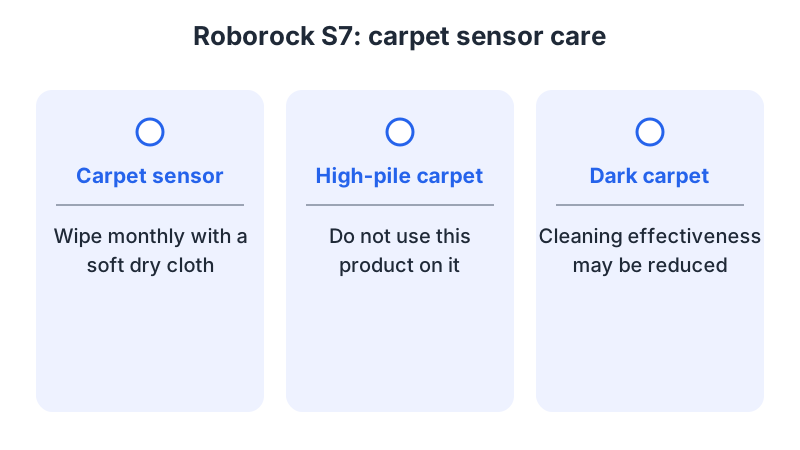
The S7 manual also says: “Do not use the product on high pile carpets (product effectiveness may also be reduced on dark carpets).” Follow that limit when choosing where the S7 runs.
The S7 manual requires switching off the product and unplugging it before cleaning or maintenance. As a precaution, follow your model’s shutdown instructions and wait for all movement to stop before wiping a sensor. For cliff and bumper sensors on other robots, see the robot vacuum sensor error guide.
Carpet avoidance and No-Mop Zones
On the Roborock S7, the VibraRise mount lifts for carpet, and carpet avoidance can be selected in the app. Its manual says No-Mop Zones activate by default when the mount is in place. For an eufy S1 Pro roller mop that rises on non-carpeted floors, one documented solution combines Normal Cleaning for the whole house with marking every carpeted area as a No-Mop Zone. As a precaution, apply one of the listed solutions at a time and check the mop after each change. For mop pad fit or wear, see the robot mop pad guide. For map problems beyond the E25/E28 carpet-zone checks above, see the mapping problems guide.
When to contact support
For the eufy E25 and E28, the article asks for your account details and the date and time of the cleaning session, with Activity Log Upload enabled. The S1 Pro article directs you to eufy support for further help. For the Roborock S7, the manual lists error texts such as Error 28. As a precaution, write down the error text shown in the app and the type of carpet before you contact the manufacturer. As a precaution, record the model name and firmware version shown in the app as well.
Frequently asked questions
Should I leave the boost setting on all the time? ECOVACS FAQ 119 recommends Auto-Boost Suction only for homes with carpet floors. On the Australian Samsung BESPOKE Jet Bot AI+, carpet-triggered suction increases work in Smart suction mode.
Why does suction go up on hard floors? ECOVACS FAQ 119 says hair tangled around the main brush can accidentally enable strong suction on non-carpet floors, and it recommends cleaning the main brush regularly.
How do these sources address carpet during mopping? The Roborock S7 manual describes lifting the VibraRise mount on carpet and selecting carpet avoidance in the app. For an S1 Pro roller mop that rises on non-carpeted floors, eufy describes combining Normal Cleaning for the whole house with No-Mop Zones over every carpeted area. As a precaution, use the guidance for your model and symptom.
Not sure which guide fits? Use the symptom checker
Checked against
Models checked: Roborock S7 Robotic Vacuum Cleaner User Manual (PDF: carpet sensor, VibraRise, Carpet Boost, Error 27 and 28); ECOVACS FAQ 119: DEEBOT Auto-Boost Suction, updated 2020/07/14; eufy support article on E25/E28 carpet detection and carpet zones on the map; eufy support article on S1 Pro carpet detection (firmware V6.9.79, Normal Cleaning, No-Mop Zone); Samsung Australia support page for BESPOKE Jet Bot AI+ suction power. These are document checks, not hands-on tests.
- Roborock S7 Robotic Vacuum Cleaner User Manual (manual; accessed )
- ECOVACS: Why isn't the Auto-Boost Suction feature of DEEBOT working? (support; accessed )
- eufy Support: What should I do if my E25/E28 robot fails to detect carpets while cleaning or if carpet zones are not displaying on the map (support; accessed )
- eufy Support: What should I do if my S1 Pro cannot correctly detect carpets (support; accessed )
- Samsung: How To Use The BESPOKE Jet Bot AI+ (Australia) (support; accessed )