Robot Mop Water Tank Not Detected? Match the Alarm
Short answer
Match the alarm to the component it names: ECOVACS FAQs 418 and 1203 cover a station clean tank and a roller-mop water tray, eufy S1 Pro codes E10, EB10 and EB12 separate the robot reservoir from the station tanks, and iRobot AutoWash Dock codes 650 and 652 cover its clean tank.
Match the tank alarm and the documented component
-
Check 1
For the ECOVACS station tank in FAQ 418, is an installed tank reported as missing?
Yes
Take the tank out, press its sealing plug and refit it. Check the small magnet; if it is lost, contact ECOVACS Customer Service.
No
-
Check 2
For the ECOVACS station tank in FAQ 418, does a tank that holds water trigger a low-water alert?
Yes
Compare the level with the float: add water if it is below, or reseat the tank if above. Contact ECOVACS if the alert continues.
No
-
Check 3
Does the ECOVACS roller-mop water tray covered by FAQ 1203 trigger a tray-not-installed warning?
Yes
Switch the power off, release the blue buckle and check the magnet. Refit the tray until it clicks, or contact after-sales service if the magnet is lost.
No
-
Check 4
Does your eufy S1 Pro report E10 for its onboard dirty-water reservoir?
Yes
Refit the reservoir until it clicks and both orange latches rise. Close the cover and press start.
No
-
Check 5
Does your eufy S1 Pro report EB10 or EB12 for a base station tank?
Yes
Put the base station's clean tank back for EB10, or its dirty tank back for EB12.
No
-
Check 6
Does your iRobot AutoWash Dock report error 650 or 652?
Yes
Use the matching dock procedure below, then retry pad washing. Contact iRobot customer care if the error persists.
No
None of these?
If the matched checks do not clear the alarm, contact support with the exact model, the component named and the error code.
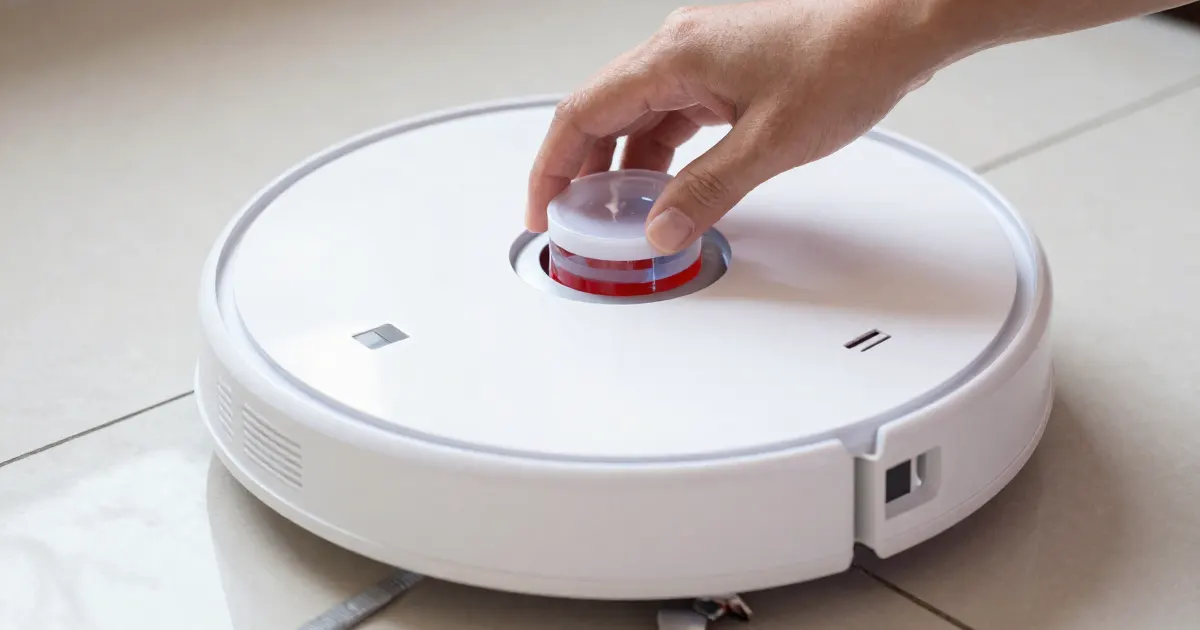
A robot mop can report several different containers: its own onboard reservoir, a clean or dirty tank in its base station, or a water tray under the robot. Some alerts say a tank is missing, and others say the water is low. Those are separate problems with separate checks, so match the alarm to the component it names before you handle anything.
Identify the alarm before handling the tank
Read the full message or code, then find the component it names. ECOVACS FAQ 418 covers a station clean tank that the robot reports as missing, and a separate low-water alert that can appear even when the tank holds water. ECOVACS FAQ 1203 covers the water tray under a roller-mop robot, which can trigger a tray-not-installed warning. The eufy S1 Pro separates its onboard dirty-water reservoir (E10) from its base station clean tank (EB10) and dirty tank (EB12). iRobot’s AutoWash Dock uses error 650 for a clean tank that has been removed from the dock, and error 652 for a problem with the level sensor of that tank.
Keep the tank-presence alarm and the low-water alarm apart. An installed tank can still trigger a presence alarm, and each alarm leads to its own check.
As a precaution, keep the station or dock on a dry surface while you lift a tank out, so that spilled water does not run onto the base.
Match the component to the documented procedure
Each procedure below applies only to the component named in its heading. The ECOVACS sealing-plug check belongs to the station clean tank, and the blue buckle belongs to the roller-mop tray. Read the complete code before you remove anything, because the eufy codes point to three different containers.
ECOVACS: station clean tank and roller-mop tray
For a station clean tank that FAQ 418 reports as missing, take the clean tank out and press its sealing plug, then put the tank back into the station. Check whether the small magnet on the clean tank is still there. If the magnet is lost, contact ECOVACS Customer Service.
For the low-water alert in FAQ 418, compare the water level with the float. If the water is below the float, add water to the tank. If the water is above the float, lift the tank out and put it back into the station. If the alert continues, the FAQ suggests gently pushing the float to check whether it is stuck. When the alert stops, the tank can be used normally. If the float will not move, or the alert continues after that check, contact ECOVACS customer service.
For the roller-mop water tray in FAQ 1203, open the top cover and switch the robot’s power off. Slightly lift the roller-mop side, open the blue buckle, remove the water tray and check the magnet inside. If the magnet is present, refit the tray to the bottom of the robot until a click sounds, then restart the robot and check whether the warning clears. If the magnet is missing, contact after-sales service.
As a precaution, carry the tray level while it is out of the robot, so any water left in it stays inside the tray.
eufy S1 Pro: robot reservoir or base station tank
For E10, the component is the robot’s dirty-water reservoir. Open the robot’s cover and check whether the reservoir is installed. Refit it at the rear of the robot until you hear a click, and check that both orange positioning latches have popped up. If you need to repeat the step, take the reservoir out, put it back in and listen for the click. Close the cover again, then press start.
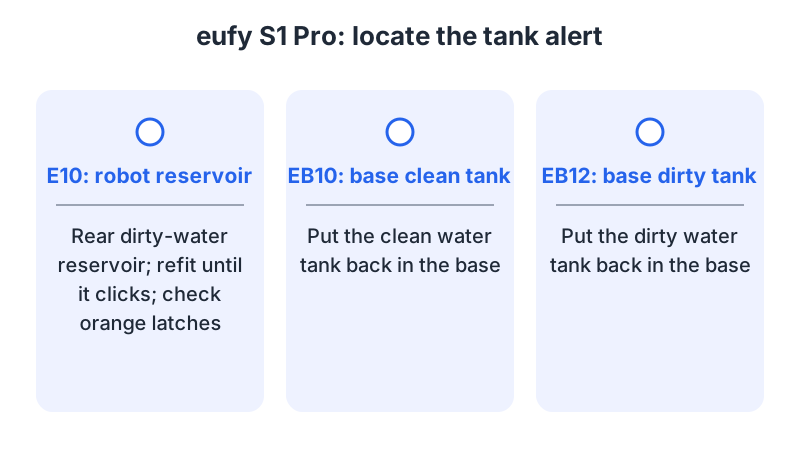
For EB10, the base station’s clean water tank is not installed or not installed properly. Put that clean tank back into the base station. For EB12, the base station’s dirty water tank is the component, so put that dirty tank back into the base station.
The eufy repair application instructions list the S1 Pro (T2080) among eligible models in the United States, Canada, the United Kingdom and Europe. The page explains how to request a return for inspection or repair; eligible issues include specified app alerts and error codes. If your issue is not clearly on that list, or you are unsure, email support@eufy.com. UK customers can write to uk.support@eufy.com.
iRobot AutoWash Dock: errors 650 and 652
Error 650 means that the clean water tank in the dock, not the one in the robot, has been removed. Place the robot on the dock, clear anything that blocks the tank from going fully in, and empty and refill the clean tank. Then reboot the dock by unplugging it and plugging it back in, and try washing the pad again. If the error persists, contact customer care.
Error 652 concerns the sensor that tracks the fluid level of the clean water tank, not the dirty tank. Dock the robot, empty and refill the clean tank, and reinsert it all the way. Reboot the dock by unplugging it and plugging it back in, then try washing the pad again. If the error persists, contact customer care.
What changes by model
As a precaution, match the complete alarm to the component and source listed below. The table lists each documented pairing and links its source.
| Brand and component | Alarm | Matching action | Source |
|---|---|---|---|
| ECOVACS station clean tank | Tank reported missing | Press the sealing plug and refit the tank; contact ECOVACS if the magnet is lost. | FAQ 418 |
| ECOVACS station clean tank | Low-water alert with water in the tank | Add water if below the float, or reseat the tank if above it. Gently check the float only if the alert persists. | FAQ 418 |
| ECOVACS roller-mop water tray | Tray not installed | Power off, release the blue buckle and check the magnet. Refit until it clicks if the magnet is present; otherwise contact after-sales service. | FAQ 1203 |
| eufy S1 Pro onboard dirty-water reservoir | E10 | Refit until it clicks and both orange latches rise. | S1 Pro guide |
| eufy S1 Pro base station clean tank | EB10 | Put the clean tank back into the base station. | S1 Pro guide |
| eufy S1 Pro base station dirty tank | EB12 | Put the dirty tank back into the base station. | S1 Pro guide |
| iRobot AutoWash Dock clean tank | 650: tank removed | Dock the robot, clear obstructions, empty and refill, reboot the dock, retry washing. | AutoWash codes |
| iRobot AutoWash Dock clean tank | 652: level sensor | Dock the robot, empty and refill, reinsert fully, reboot the dock, retry washing. | AutoWash codes |
ECOVACS: station clean tank and roller-mop tray
ECOVACS documents two components: FAQ 418 for the station clean tank and FAQ 1203 for the roller-mop water tray. As a precaution, confirm with ECOVACS that the relevant FAQ applies to your model before following it.
eufy S1 Pro: robot reservoir and base station tanks
The S1 Pro guide assigns a separate code to each container. The repair application page lists the S1 Pro (T2080) as eligible in the United States, Canada, the United Kingdom and Europe.
iRobot AutoWash Dock: clean tank
Both codes concern the dock’s clean tank: 650 reports a removed tank, and 652 reports a problem with its level sensor. Use the error number reported in the app to choose the procedure.
When the alarm stays after these checks
Record the brand, model, exact alarm or code, the container it names and the steps you completed. For ECOVACS, a lost magnet or a low-water alert that continues after the float check goes to customer or after-sales service. For eufy, email support@eufy.com if the issue is not clearly listed as eligible. For AutoWash Dock codes 650 or 652 that persist, contact iRobot customer care.
As a precaution, do not run the robot or dock while a tank is only partly seated, since a loose tank may not register correctly.
If the robot mops but the pad stays dry, the problem may be the water path rather than the tank alarm. Use the robot mop not spraying water guide for that case. If water is left on the floor after mopping, the robot mop leaving water puddles guide covers that symptom. For a numeric code on the robot, the robot vacuum error codes guide is the next step. For a smell from the station, use the robot mop station smells guide.
Common questions
Does a click prove the tank is seated?
For the ECOVACS roller-mop tray, the FAQ says a click when the tray is refitted to the bottom of the robot means it is in place. For the eufy S1 Pro, the E10 steps also ask you to listen for a click and check both latches.
What should I do if the magnet is missing?
Both ECOVACS FAQs send you to customer service or after-sales service when a magnet is lost, rather than to a home repair. For eufy, the repair application page directs issues outside its listed categories to email support.
Does every tank alarm mean the same thing?
No. ECOVACS FAQ 418 separates a missing-tank alert from a low-water alert. For AutoWash Dock, error 650 concerns a removed clean tank and error 652 concerns that tank’s level sensor. Use the matching procedure above, then contact the manufacturer if the error persists after those steps.
Not sure which guide fits? Use the symptom checker
Checked against
Models checked: ECOVACS station clean tank (FAQ 418); ECOVACS roller-mop water tray (FAQ 1203); eufy S1 Pro (E10, EB10, EB12); iRobot AutoWash Dock (650, 652). These are document checks, not hands-on tests.
- ECOVACS FAQ 418: station clean-tank presence and water-level alarms (support; accessed )
- ECOVACS FAQ 1203: roller-mop water tray not installed (support; accessed )
- eufy S1 Pro Common Voice Errors and Basic Troubleshooting Guide (support; accessed )
- eufy Repair Application Instructions (support; accessed )
- iRobot AutoWash Dock Error Codes (support; accessed )