Robot Vacuum Skipping Spots? Check Obstacles, Edges and Map
Short answer
Match the missed area to the checks the manufacturer pages give: map and access checks in eufy's missed-areas article and ECOVACS DEEBOT FAQs, edge checks for eufy S2, edge mode on listed RoboVac models, and lighting or re-mapping checks in Samsung's FAQ. Measure tight gaps and inspect the doorway before changing settings. Use only the app controls available on your model.
Missed spot: choose the check for your model
-
Check 1
Is the missed area absent from the existing map, or did cleaning start away from the station?
Yes
Check the start point and the map as described below. Use the mapping guide if the area is absent.
Open the guideNo
-
Check 2
Does your eufy S2 leave an edge or corner uncleaned?
Yes
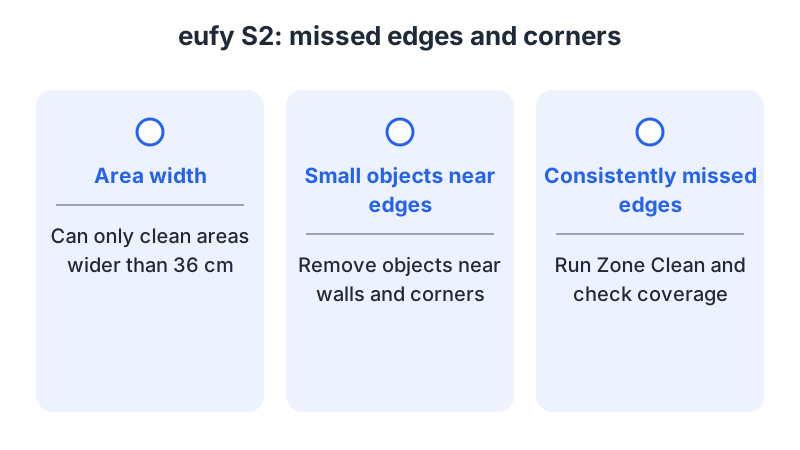
Measure the gap: the S2 article says it cleans only areas wider than 36 cm. Clear objects by the wall, then try Zone Clean on accessible edges.
No
-
Check 3
Does your DEEBOT stop at a doorway, carpet or sill?
Yes
Check the ECOVACS FAQ 481 and FAQ 102 steps below, and your model's own crossing specification.
No
-
Check 4
Does your Samsung robot miss spots in a darker, cluttered room?
Yes
Turn on the lights and clear obstacles. For a repeated miss, request a re-map in SmartThings if your app shows the option.
No
-
Check 5
Does the same accessible spot remain uncleaned after these checks?
Yes
If the eufy missed-areas steps apply, turn on log upload and run the robot several more times before contacting support.
No
None of these?
If an accessible spot is still missed, contact support with your model, the location, the time and a map screenshot if your app provides one.
This guide groups the manufacturer checks into four topics: access, lighting and obstacles, edges, and mapping. To choose a check, the guide suggests noting whether the robot could reach the spot, whether the area appears on its map, and whether dirt remained after it passed through.
Why a robot skips a spot
The guide groups the checks below by topic; choose the topic that matches the missed area.
- Access. Doorways with a threshold, entrance carpets, mats and cords can block the robot. ECOVACS FAQ 481 says that a carpet, mat or sill above 2 cm stops the robot from passing. FAQ 102 gives 16 mm for a threshold it cannot climb unaided. These are different figures from different FAQs, so check your model’s own specification.
- Lighting and obstacles. Samsung’s FAQ says a dark, cluttered room can lead to incomplete coverage and recommends more light and fewer obstacles.
- Edges and gaps. The eufy S2 article says the robot cleans only areas wider than 36 cm. Tight corners and dark or transparent surfaces near walls are also covered there.
- The map. eufy’s missed-areas article asks you to confirm that cleaning started from the station and that the missed area is shown on the existing map. ECOVACS FAQ 102 covers map resets and moving the dock. Samsung covers re-mapping in SmartThings.
Identify what kind of miss you see
Note whether the same place is missed each time or whether the gap changes between runs. Record the location, any doorway obstacle and whether the robot entered the area. This record is the guide’s suggestion, and it makes support requests easier to answer.
For a robot with a saved map, compare the location with the app. A missing area belongs in the mapping problems guide. If the robot crosses a boundary you marked as off-limits, use the no-go zone guide.
What changes by model
The table lists what each manufacturer source says for this symptom. Before following a map or cleaning-mode step, check that your app shows the named control.
| Brand and model | Coverage topic | What the source says | Source |
|---|---|---|---|
| eufy, missed-areas article | Missed certain areas | Check that cleaning started from the station and that the area appears on the existing map; check for obstacles blocking the path; check that people or pets did not move the robot; compare the edge wheels for uneven wear | eufy missed-areas article |
| eufy, missed-areas article | Log upload | Turn on log upload and run the robot several more times | eufy missed-areas article |
| eufy S2 | Edge cleaning | Cleans only areas wider than 36 cm; clear small objects near walls and corners; use Zone Clean on an edge that stays missed | eufy S2 edge article |
| eufy S2 | Dark or transparent surfaces | These can keep the robot farther from walls; adjust the lighting or clean those areas more often | eufy S2 edge article |
| eufy RoboVac 15C, 25C, 30C, 35C, 15C Max, 25C Max, 30C Max | Edge mode | Select Edge in the eufy Clean app, alongside Auto, Quick Clean and Spot | eufy cleaning modes article |
| ECOVACS DEEBOT (FAQ 481) | Entrance carpet or mat | With avoid-carpet mode set, an entrance carpet or mat can block the area; the FAQ suggests switching to Auto strategy | ECOVACS FAQ 481 |
| ECOVACS DEEBOT (FAQ 481) | Carpet or sill height | Carpet, mat or sill above 2 cm stops the robot passing; adjust so it can get in | ECOVACS FAQ 481 |
| ECOVACS DEEBOT (FAQ 102) | Map and dock | Start from the dock without moving the unit during cleaning; if areas are still missed, reset the map, move the dock and restart from the dock | ECOVACS FAQ 102 |
| ECOVACS DEEBOT (FAQ 102) | Thresholds and cleaning options | Thresholds above 16 mm are too tall to climb unaided; Continuous Clean resumes after recharging; try Custom Clean for narrow missed areas, which may be difficult or impossible to enter | ECOVACS FAQ 102 |
| Samsung robot vacuum (FAQ ANS10002355, names Jet Bot models) | Lighting and obstacles | Turn on the room’s lights and clear obstacles and clutter from the floor | Samsung Jet Bot FAQ |
| Samsung robot vacuum (FAQ ANS10002355, names Jet Bot models) | Revisits and re-mapping | The vacuum attempts to revisit missed spots; request a re-map in SmartThings; the map-update answer calls for clearing existing mapping before re-mapping | Samsung Jet Bot FAQ |
eufy: missed areas and edge mode
The eufy missed-areas article asks you to check that cleaning started from the station and that the missed area appears on the existing map. It also asks you to check for obstacles blocking the path in that area or room, to make sure people or pets did not move the robot during cleaning, and to compare the edge wheels for uneven wear. Its last step is to turn on log upload and run the robot several more times.
If you notice uneven wheel wear, this guide suggests noting which side is affected and reporting it to support with your observations.
On the eufy S2, the edge article says the robot cleans only areas wider than 36 cm. A narrower gap is not a setting to change. For an accessible edge, remove small objects near walls and corners, then use Zone Clean on the area that remains dirty and watch whether the robot enters it. For the RoboVac 15C, 25C, 30C, 35C, 15C Max, 25C Max and 30C Max, the cleaning modes article lists Edge with Auto, Quick Clean and Spot. Select Edge in the eufy Clean app. After the Edge run, this guide suggests checking whether the missed area is clean.
ECOVACS DEEBOT
ECOVACS FAQ 481 separates a repeated miss in one area from gaps that move between runs. For the same area, it asks you to check whether Bypass carpet cleaning is set to avoid carpet. In that setting, an entrance carpet or mat can make the robot skip the area; the FAQ suggests trying Auto strategy. For misses in different places, it advises against following the robot during cleaning and suggests moving objects the robot steers around out of the cleaning area.
FAQ 102 starts from the dock and asks you not to pick up or relocate the unit during cleaning, so it can build a complete map. For a home too large for one charge, Continuous Clean returns the unit to the dock when the battery runs low and resumes the unfinished area afterwards. For areas only slightly wider than the unit, the FAQ suggests trying Custom Clean, while warning that entering them may be difficult or impossible. The FAQ gives 16 mm as the height above which a doorway threshold is too tall for the unit to climb, so you need to help it over the threshold. If areas are still missed, reset the map, move the dock to another room or wall, and start cleaning from the dock again. If the problem persists, the FAQ says to turn off the AI function in the app and start from the dock again.
FAQ 102 also asks you to remove light, soft rugs or mats, cords and footwear from doorways, and not to stand for long in doorways, halls or other narrow passages. Apply the AI-function and map steps only on a model whose app offers them.
Samsung Jet Bot FAQ
Samsung’s FAQ, which names Jet Bot models, says, for incomplete coverage in a dark or cluttered room, to turn on the room’s lights so the vacuum can navigate more reliably, and to clear obstacles and clutter from the floor. It describes up to two more attempts before a cycle ends; separately, it mentions up to three attempts when explaining why the vacuum docks and stays there. Auto Clean resumes after recharging. For focused cleaning, the FAQ suggests Manual or Point Cleaning mode, or Spot Clean on certain models, and using the remote for directed cleaning. It also says that lifting the vacuum during operation erases its navigational map.
For missed areas, the FAQ mentions reflective surfaces or an object present during mapping as possible reasons, and suggests requesting a re-map in SmartThings. In its separate map-update answer, it says mapping does not happen every time and instructs you to clear existing mapping to re-map the area.
When to stop and contact the manufacturer
If the same accessible spot remains uncleaned after the relevant checks, contact support with the model, the app, the location, the time of the miss and what changed after each attempt. Include a map screenshot if your app provides one. This guide suggests telling support whether the spot is physically inaccessible or whether the robot repeatedly avoids an accessible area.
If the eufy missed-areas steps apply to your robot, turn on log upload, then run the robot several more times and note the time of the problem. The article asks you to keep people from moving the robot; keeping people and pets away during the test is also this guide’s advice, so the test reflects the check you made.
For broader symptoms, start with the robot vacuum troubleshooting guide.
Not sure which guide fits? Use the symptom checker
Checked against
Models checked: eufy RoboVac missed-areas support article; eufy S2; eufy RoboVac 15C, 25C, 30C, 35C, 15C Max, 25C Max, 30C Max; ECOVACS DEEBOT FAQ 481; ECOVACS DEEBOT FAQ 102; Samsung Jet Bot FAQ ANS10002355. These are document checks, not hands-on tests.
- eufy: What should I do if my RoboVac misses cleaning certain areas (support; accessed )
- eufy: What Should I Do If My S2 Robot Has Poor Edge Cleaning Performance (support; accessed )
- eufy: How Do I Adjust Cleaning Modes in the eufy Clean App (support; accessed )
- ECOVACS FAQ 481: What should I do if the robot missed areas while cleaning (support; accessed )
- ECOVACS FAQ 102: DEEBOT misses certain areas when it cleans (support; accessed )
- Samsung: Jet Bot robot vacuum mapping and pattern cleaning FAQs (support; accessed )