Beldray Cordless Vacuum Troubleshooting: BEL02091, BEL01163
Short answer
On the Beldray BEL02091, a clogged floor brush makes a fault light flash for about 8 seconds before the motor stops, and a main air inlet clogged for 3-5 seconds stops the motor and flashes the clogging indicator. Clear the blockage, empty the dust container, clean the HEPA filter and charge fully with the supplied adaptor. On the Revo Digital BEL01163, a red light that flashes on the charging base means it is charging, and a light that flashes during use means the battery is running low.
Beldray cordless vacuum stops or flashes: checks from the manuals
-
Check 1
Does a BEL02091 fault light flash for about 8 seconds?
Yes
The floor brush is clogged: switch off, remove the brush bar and clear hair and debris.
Open guide: Cordless Vacuum Brush Bar Not SpinningNo
-
Check 2
Did the BEL02091 motor stop with the clogging indicator flashing?
Yes
The main air inlet is clogged: disconnect the attachment and clear the blockage.
Open guide: Cordless Vacuum Keeps Cutting OutNo
-
Check 3
Is suction weak?
Yes
Empty the dust container and clean the HEPA filter; on the BEL02091, also clear the air inlet.
No
-
Check 4
Is the light flashing while it charges?
Yes
That shows charging: red on the BEL01163, green on the BEL02091. Use only the supplied adaptor.
Open guide: Cordless Vacuum Flashing Red LightNo
-
Check 5
Is a light flashing during use?
Yes
The battery is low: the BEL01163 light flashes, and the BEL02091 light flashes twice per second below 10%.
No
None of these?
If it was dropped or damaged, stop using it and contact Beldray Customer Services through www.beldray.com.
A Beldray BEL02091 that stops on its own may be protecting itself from a blockage: its manual describes a floor brush protection and an air inlet protection, each with its own flashing light. Clear the blockage, empty the dust container, clean the HEPA filter and recharge with the supplied adaptor. The Revo Digital BEL01163 uses one indicator light for charging, power level and low battery, so a red or flashing light does not mean the same thing on both models. Match your product code to the rows below.
How to fix a Beldray cordless vacuum that keeps stopping: step by step
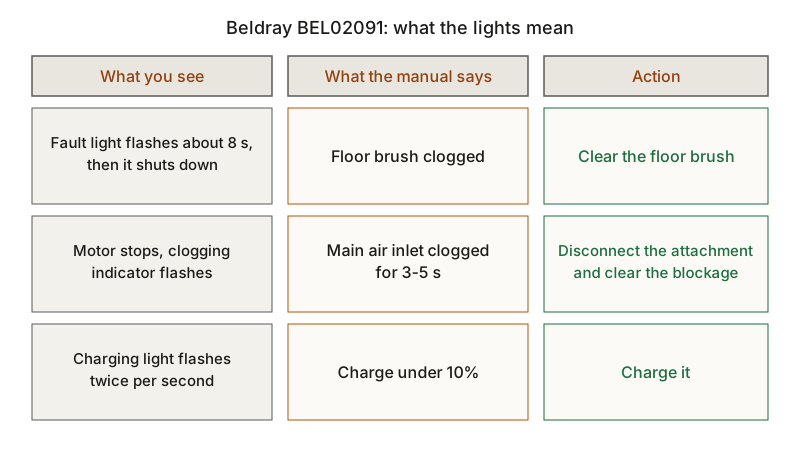
- Switch it off and note which light flashed. On the BEL02091, a fault light flashing for about 8 seconds means a clogged floor brush, a flashing clogging indicator means a clogged air inlet, and the charging light flashing twice per second means under 10% charge. On the BEL01163, a flashing light in use means the battery is running low.
- Clear the air inlet. The BEL02091 manual says the motor stops when the main air inlet is clogged for 3-5 seconds, and its troubleshooting table says to disconnect the attachment and clear the blockage. Both manuals ask you to switch off before changing attachments.
- Clean the floor brush. On the BEL02091, detach the floor brush with its release button, rotate the brush bar release tab, lift the brush bar out and remove dust, debris and hair before refitting it. For hair on the anti-wrap brush, the manual also allows cutting it away with scissors.
- Empty the dust container and clean the HEPA filter. Both manuals say to empty the dust container when suction drops. The BEL02091 HEPA filter is shaken, rinsed under clean, warm water and left to dry naturally, with no detergent and no radiator, and must be fully dry before use. The BEL01163 HEPA filter and filter cone are cleaned with the brush provided, with the dust container empty.
- Charge it fully with the supplied adaptor. The BEL02091 needs about 5 hours before first use, with the battery pack clicked in; its manual lists a loose adaptor or a battery that is not secured behind a vacuum that will not charge. The BEL01163 needs about 4-5 hours in its charging base. Both manuals say to use only the adaptor supplied.
- Stop and contact Beldray if it still fails or was damaged. The BEL01163 guide says to stop using a vacuum that has been dropped or damaged, that it has no user serviceable parts, and that only a qualified electrician should repair it. It sends you to Customer Services at www.beldray.com, and to the retailer with your receipt for a return.
Other brands’ cut-out protections are compared in the cordless vacuum keeps cutting out guide.
Beldray lights and faults: what the manual says
Each row names the model whose manual describes it. Other brands’ red lights are compared in the cordless vacuum flashing red light guide.
| Model | Light or symptom | What the manual says | Action | Source |
|---|---|---|---|---|
| BEL01163 | Indicator flashes red on the charging base | Charging; it turns blue when full | Leave it to charge | BEL01163 guide |
| BEL01163 | Indicator blue or red in use | Blue is maximum power (boost), red is minimum | Press the boost button to switch | BEL01163 guide |
| BEL01163 | Indicator flashes in use | Battery running low | Charge it | BEL01163 guide |
| BEL01163 | Suction drops | Dust container needs emptying | Empty the dust container | BEL01163 guide |
| BEL02091 | Charging light flashes green | Charging; it stays lit when full | Leave it to charge | BEL02091 manual |
| BEL02091 | Charging light flashes twice per second | Charge under 10% | Charge it | BEL02091 manual |
| BEL02091 | Fault light flashes about 8 s, then it shuts down | Floor brush clogged | Clear the floor brush | BEL02091 manual |
| BEL02091 | Motor stops, clogging indicator flashes | Main air inlet clogged for 3-5 s | Disconnect the attachment and clear the blockage | BEL02091 manual |
| BEL02091 | Will not charge | Adaptor not securely connected, or battery not secured | Reconnect the adaptor and seat the battery pack | BEL02091 manual |
| BEL02091 | Poor suction | Air inlet blocked, dust container almost full or HEPA filter blocked | Clear the inlet, empty the container, clean the filter | BEL02091 manual |
| BEL02091 | Brush bar not rotating | Brush bar blocked by hair, dust and debris | Clean the floor brush | BEL02091 manual |
A brush bar that will not turn on other brands is covered in the cordless vacuum brush bar not spinning guide.
What changes by model
Beldray Revo Digital BEL01163
The Revo Digital comes with a charging base, a crevice tool, an upholstery tool and a brush tool that fits onto the crevice tool. It has a non-removable 11.1 V 2000 mAh lithium-ion battery, a 100 ml dust container and an adaptor rated 14.0 V 0.5 A output. The quick start guide says not to use it without the HEPA filter, filter cone and dust container in place, and asks for the HEPA filter and filter cone to be cleaned at least once every three weeks. For the full manual, it points to www.beldray.com/manuals.html and the product code BEL01163. Fixes for other handhelds are in the handheld vacuum troubleshooting guide.
Beldray BEL02091
The BEL02091 comes with a tube, a floor brush with a removable brush bar, an extendable brush tool, a crevice tool and a wall mount storage base. Its 29.6 V 2200 mAh lithium-ion battery pack slides off with the battery release button and can be charged on its own, and its adaptor is rated 36 V 0.5 A output. The power trigger starts it in ECO, and the touch function button cycles through ECO, NORMAL and TURBO. The LED display shows four charging bars when it is fully charged. The manual asks for the dust container and HEPA filter to be cleaned at least every two weeks with clean water and for the HEPA filter to be replaced when it becomes worn. The dust tank holds 700 ml.
The two adaptors have different outputs, and each manual says to use only the adaptor supplied with that vacuum.
Frequently asked questions
Why is my Beldray vacuum flashing red?
On the Revo Digital BEL01163, the indicator flashes red while the vacuum charges on its base and turns blue when it is full. In use, a steady red light means the minimum power setting, and a flashing light means the battery is running low.
Why does my Beldray cordless vacuum keep cutting out?
The BEL02091 manual describes two protections. A clogged floor brush makes a fault light flash for about 8 seconds, then the motor stops if the blockage stays. A main air inlet clogged for 3-5 seconds stops the motor and flashes the clogging indicator. Clear the blockage, then check the charge, since the light flashes twice per second below 10%.
How often should I clean the Beldray HEPA filter?
At least every two weeks on the BEL02091, rinsed with clean water and fully dried before refitting. At least once every three weeks on the BEL01163, together with the filter cone, using the brush provided.
Not sure which guide fits? Use the symptom checker
Checked against
Models checked: Beldray BEL02091; Beldray Revo Digital BEL01163. These are document checks, not hands-on tests.
- Beldray Revo Digital BEL01163 quick start guide (manual; accessed )
- Beldray BEL02091 vacuum cleaner user manual (manual; accessed )