Cordless Vacuum Keeps Beeping? Record the Signal Before Resetting
Short answer
Record where the beep comes from and when it occurs, together with the model and any light or message. Do not assume that a beep means blockage, overheating or a worn battery.
Short answer: identify the signal before acting
A beep on its own does not name a fault. Record the exact model, when the sound occurs, and any accompanying light, icon or message. LG documents an audible clog alarm for the CordZero A7; the Samsung Jet Stick, BISSELL 2284/2389/2390 and Tineco litevak examples below describe visual indicators. If you cannot match the beep to a documented alert, consult your model’s manual and contact support with a recording. For an accompanying symptom, use the flashing red light guide or the cutting-out guide.
Use the accompanying visual indicator to choose a model-specific check:
- Charging state. On the BISSELL 2284/2389/2390 hand vacuums, a blinking red charge light means charging is in progress; green means fully charged.
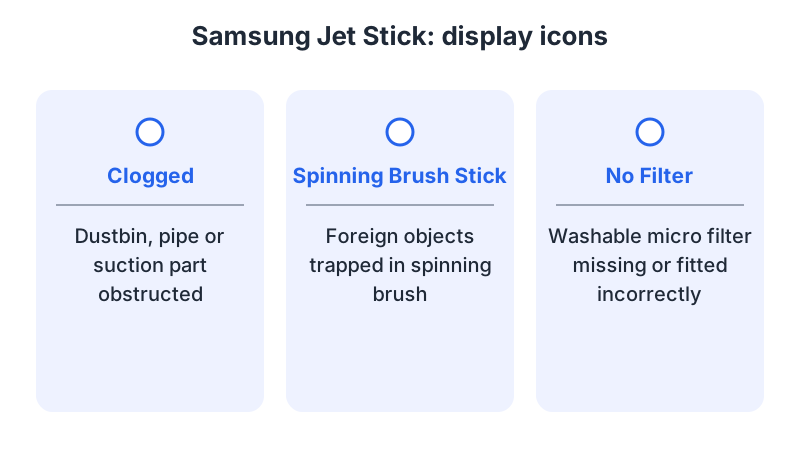
- A blockage or trapped object. On the Samsung Jet Stick, the Clogged icon points to the dustbin, pipe or suction part; the Spinning Brush Stick icon points to a trapped brush object.
- An overheating stop. Samsung’s Jet troubleshooting guidance describes automatic shutdown when the vacuum overheats. Follow the applicable shutdown procedure below.
- A signal requiring support. For the BISSELL 2284/2389/2390 hand vacuums, red and green blinking or no power calls for contacting BISSELL.
What changes by model
Each manufacturer uses its own lights and icons, so a signal from one product cannot be read through another brand’s table. Read each row only against the model it names.
| Model | Light, icon or sound | What the source says it means | Source |
|---|---|---|---|
| Samsung Jet Stick | Clogged icon | The dustbin, pipe or suction part is obstructed | Samsung display indicators |
| BISSELL 2284/2389/2390 | Charge light blinks red, then turns green | Charging in progress, then fully charged | BISSELL charging |
| Tineco litevak | Battery indicator solid blue, or rapidly blinking red | Fully charged, or battery out of power | litevak FAQ |
| LG CordZero A7 | Clog LED blinking, then an alarm | A clog that remains shuts the vacuum off and sounds the alarm | LG LED indicators |
Samsung Jet Stick
The Jet Stick display shows status indicators and maintenance alerts. Three icons concern the cleaning path. The Clogged icon means the dustbin, pipe or suction part is obstructed. The Spinning Brush Stick icon means foreign objects are trapped in the spinning brush. The No Filter icon means the washable micro filter is missing or not installed correctly. The Suction Power icon only shows the selected suction level, so it is not an alert (Samsung display indicators).
If the Clogged, Spinning Brush Stick and No Filter icons blink or turn red and the vacuum stops, check all three areas before running it again.
Samsung’s UK troubleshooting page distinguishes two Jet power problems. If the vacuum will not start, switch it off and inspect the pipe, dustbin and brush for blockages. After clearing a blockage, leave it for at least 5 minutes and up to 30 minutes. If power cuts out during use, Samsung explains that overheating triggers an automatic stop and recommends checking the pipe and brush for blockages and cleaning the filter (Samsung troubleshooting).
BISSELL 2284/2389/2390
BISSELL’s charging page covers the 2284, 2389 and 2390 lithium-ion cordless hand vacuum. The machine must be in the OFF position to charge, and the charger plugs into the charge port on the machine. The charge light blinks red while charging and turns green once the battery is fully charged. A full charge takes 8 hours. The adaptor may become warm during charging, which BISSELL calls normal. If the machine blinks red and green together, or has no power, BISSELL asks you to contact the company (BISSELL charging).
Tineco litevak
The litevak FAQ describes the battery indicator. A solid blue light means the appliance is fully charged. A rapidly blinking red light means the battery is out of power and should be charged as soon as possible. The FAQ gives 3 to 4 hours for the first charge and for a full charge. It also advises keeping the battery half-charged every 3 months, and notes that two battery indicators glow in regular mode (litevak FAQ).
LG CordZero A7
On the LG CordZero A7, the clog LED blinks when dust or debris builds up in the extension pipe, nozzle or filters. If the blockage remains, the vacuum shuts off and an audible alarm sounds. The blinking LED is a visual warning; the alarm is the documented sound associated with the unresolved clog.
The battery LEDs follow a different logic. A blinking red LED means a non-genuine battery is installed, and the vacuum will not run until a genuine battery is used. A solid red LED means the battery has reached the end of its life after more than 650 charging cycles. The three battery-level LEDs show the charge and blink when the battery is low. A filter cleaning light turns on after 640 minutes of total run time (LG LED indicators).
Locate the sound without dismantling the cleaner
Note whether the beep comes from the vacuum body, a charging station or another nearby device. Record its timing: when charging begins, when the trigger is pressed, during cleaning or after shutdown. A station signal and a vacuum alert should not be treated as the same code.
Stop use and charging if there is smoke, a burning smell, visible damage or abnormal heat. Do not restart the machine just to hear the pattern again.
Make a useful signal record
Write down the full product code, the attached tool and the operating mode. Add the number of beeps if they form a clear repeating group, the interval between groups, and the text or colors displayed at the same time. Note whether the cleaner keeps running or stops.
If the sound began after a change, record that change: a replacement filter, a different head, a new charger or a recently washed part. This is context for diagnosis, not proof that the change caused the alert.
Find the sound or alert section in the manufacturer’s manual or support app. If it does not list the pattern you heard, contact support with the model number and a recording, and ask for the matching procedure.
Follow the signal you can match
Match an accompanying light or icon to the exact model described above; a matching color alone does not identify the sound. Switch the vacuum off and disconnect it from charging before clearing a blockage or trapped brush object, following the model’s manual. For a Samsung Jet Stick icon, inspect the area the icon names. For an LG CordZero A7 clog alarm, inspect the extension pipe, nozzle and filters. For a BISSELL 2284/2389/2390 hand vacuum with red and green blinking or no power, contact BISSELL. If an unidentified signal accompanies a malfunction, keep the vacuum out of service until the fault is identified. Do not wash every filter, replace a battery or leave the machine running until the beeps stop on a guess. Each of those steps should follow a signal that the model’s own sources describe.
FAQ
Does a beep mean the battery is worn? These are visual battery indicators. On the LG CordZero A7, a solid red Battery Care LED marks the end of battery life after more than 650 charging cycles. On the Tineco litevak, a rapidly blinking red battery indicator means the battery is empty. Match each light to its model; identify the beep separately using that model’s manual.
Can I reset the vacuum to stop the beep? Use only the reset procedure in the manual for your exact model.
What if the vacuum also cuts out? For Samsung Jet vacuums, the UK troubleshooting page describes an automatic stop if the vacuum overheats. Its power-cutout procedure is to check the pipe and brush for blockages and clean the filter, with the vacuum switched off before maintenance. For another model, follow its own shutdown instructions. See the cutting-out guide for that symptom.
Related routes: light meanings, charging, brush not spinning and cutting out.
Not sure which guide fits? Use the symptom checker
Checked against
Models checked: Samsung Jet Stick display indicators; Samsung Jet (UK troubleshooting); BISSELL 2284/2389/2390 indicator documentation; Tineco litevak battery indicators; LG CordZero A7 LED indicators. These are document checks, not hands-on tests.
- BISSELL 2284/2389/2390 charging (support; accessed )
- Samsung Jet Stick display indicators explained (support; accessed )
- How to troubleshoot & resolve a Jet Vacuum power issue (support; accessed )
- litevak Cordless Stick Vacuum FAQ (support; accessed )
- LG CordZero A7: what do the LED indicators mean (support; accessed )