Cordless Vacuum Keeps Cutting Out? Note the Shutdown Type
Short answer
As a precaution, avoid repeated restarts; record whether the motor pulses, only the brush stops or all power disappears. Use the exact model’s warning and blockage procedure; shutdown is not proof of a failed battery.
Cordless vacuum keeps cutting out: suggested checks
-
Check 1
Is there an electrical smell, smoke, swelling or abnormal heat?
Yes
As a precaution, stop use and charging. Do not keep pulling the trigger to see whether a protection circuit stays on.
No
-
Check 2
Is the dust container full, or are the filters clogged?
Yes
As a precaution, switch off and isolate it as its manual requires. Check the dust container and filters using your model's maintenance steps.
No
-
Check 3
Is the brush, tube or hose blocked?
Yes
As a precaution, switch off and isolate it as its manual requires. Clear the blockage and follow any cooling instructions before restarting.
No
-
Check 4
Did it switch off after running hot, or with its light flashing very quickly?
Yes
Follow your model's cooling instructions. For a rapid-flashing stop on Tefal HANDSTICK X-FORCE FLEX 15.60, turn it off and cool for at least 1 hour.
No
-
Check 5
Does the last LED of the battery indicator blink?
Yes
Electrolux and AEG use a blinking last LED for an empty battery. Match your model's indicator; a flat battery needs a full charge.
No
None of these?
As a precaution, if it cuts out again after cooling and cleaning, stop restarting it and contact the manufacturer's service with the model number.
Short answer
A cordless vacuum that keeps cutting out may be protecting itself from overheating or signaling a low battery. The manufacturer pages cited here describe a full dust container or clogged filters, a blocked brush or tube, overheating that triggers an automatic stop, and an empty battery shown by a blinking light. The sections below follow this guide’s editorial order, not a universal diagnostic sequence or a ranking of repair costs. Do not conclude that the battery has failed from the stop alone.
Describe the shutdown precisely
A motor that starts and stops in a pattern, a brush that stops while suction continues, and a cleaner that goes completely dead are different symptoms. Record which one you see, the power mode, the attached tool and any light still showing after the stop. You will need these details when you contact support.
Samsung’s Jet page says Jet vacuums cut out when they reach a certain temperature, and that an overheating unit stops automatically to prevent heat damage. Tefal’s FAQ describes a stop during operation with the light or lights flashing very quickly, with a warning that the device may be overheating. Its power brush also has a heat safety device that can trigger on its own. Electrolux and AEG tie a blinking last LED to an empty battery.
As a precaution, stop use and charging if there is an electrical smell, smoke, damaged wiring, swelling or abnormal heat. Do not keep pulling the trigger to see whether a protection circuit will stay on.
What changes by model
The table lists each cited source, the symptom it covers and the step it gives. Cooling times differ by brand, so the figure in your own manual governs.
| Brand and model | Symptom the source covers | Step the source gives |
|---|---|---|
| BISSELL 2284/2389/2390 | Turns on, then off after a few seconds; light solid green while charging | Refers the case to a separate brush troubleshooting article; blinking red and green, or no power, goes to support |
| Samsung Jet (UK support) | Automatic stop on overheating; cut-outs after prolonged use of the Extension Crevice Tool | Check pipe and brush for blockages and clean the filter; this power-cutout section gives no cooling time |
| Electrolux stick vacuum (AU support) | Stops with a full dust container or clogged filters, which may mean overheating; blinking last LED for an empty battery | If it may have overheated, cool at least 2 hours on the charging stand before restarting |
| AEG cordless vacuum (UK support) | Blocked brush roller, full dust container, clogged filters or empty battery | For possible overheating, cool at least 2 hours on the charging stand; if it still does not work, contact an authorized AEG service center |
| Tefal HANDSTICK X-FORCE FLEX 15.60, rapid-flashing stop | Stops during operation with the light or lights flashing very quickly | Turn off and cool for at least 1 hour; if the fault continues, contact customer service |
| Tefal HANDSTICK X-FORCE FLEX 15.60, power brush | Heat safety device on the power brush has triggered | Stop, check brush rotation, remove any obstruction and clean the power brush before restarting |
BISSELL 2284/2389/2390
The BISSELL article covers these three models. It describes a machine that turns on and then off after a few seconds, with a solid green light while charging, and it sends that case to a separate brush troubleshooting article. A blinking red and green light, or no power at all, goes to support. Note the light color, because the article’s routing depends on it.
Samsung Jet
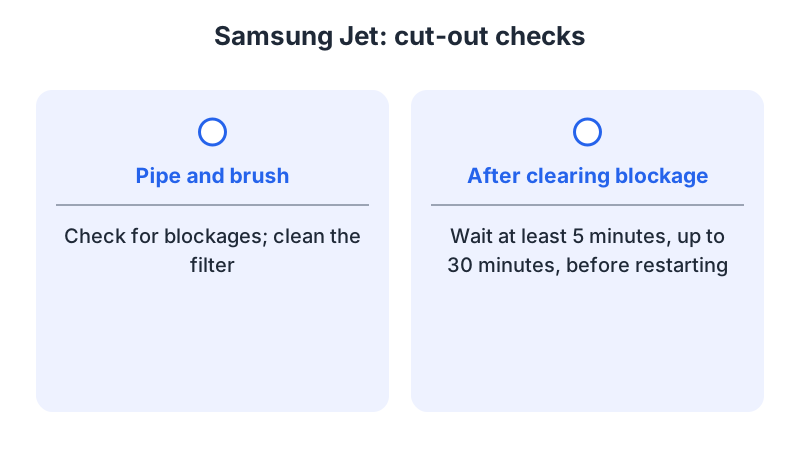
Samsung’s Jet page links cut-outs to two situations: overheating, which triggers an automatic stop to prevent heat damage, and prolonged use of the Extension Crevice Tool. The fix it gives for either is to check the pipe and brush for blockages and clean the filter. Samsung’s separate no-start section gives a 5-to-30-minute wait after clearing a blockage; its power-cutout section does not specify a wait.
Electrolux (AU) and AEG (UK)
The Electrolux and AEG articles are both written for stick vacuums in general. Each lists a blocked brush roller, a full dust container or clogged filters, an empty battery and a defective model as causes. Each says that a full dust container or clogged filters can mean the vacuum has overheated, and each advises cooling it for at least 2 hours on the charging stand before restarting. Both tie a blinking last LED to an empty battery. The AEG article adds that if the unit still does not work, you should contact an authorized AEG service center with the model number, PNC number and serial number from the rating plate.
Tefal HANDSTICK X-FORCE FLEX 15.60
The cited Tefal FAQ treats two stops separately. A stop during operation, with the light or lights flashing very quickly, is described as possible overheating; the FAQ says to turn the device off and let it cool for at least 1 hour, and to contact customer service if the fault continues. The power brush’s heat safety device is a different case: when it triggers, the FAQ says to stop, check for an obstruction, remove it and clean the power brush if obstructed, then turn the vacuum back on.
The same FAQ discusses tube or hose blockages, a full dust collector and foam motor filter cleaning under poor suction or whistling, rather than shutdowns. Its separate advice to replace a filter in poor condition concerns declining performance and does not identify the filter type.
For the shutdown cases described here, Tefal specifies at least 1 hour after a rapid-flashing stop; Electrolux and AEG specify at least 2 hours on the charging stand after possible overheating. Follow your model’s instructions.
Samsung also notes that prolonged use of the Extension Crevice Tool can cause a power cut-out. If a stop appears only with one attachment or in the strongest mode, the observations in the last section matter more than any general rule.
Inspect the documented maintenance points
As a precaution, switch off and isolate the vacuum as its manual requires before inspecting it. Follow the maintenance instructions for your exact model. For shutdowns, Samsung names the pipe, brush and filter; Electrolux and AEG name the brush roller, dust container and filters. Tefal’s rapid-flashing shutdown FAQ specifies cooling, while its power-brush shutdown FAQ specifies checking for obstructions.
As a precaution, open only the covers that the manual designates for owner maintenance, and do not run the cleaner partially assembled or without a filter the manual requires.
As a precaution, if a filter was recently washed, confirm its approved cleaning method and complete dryness before refitting. See filter care. If a brush is visibly tangled, remove the hair, threads and fibers before restarting, and use brush inspection for the model’s own release instructions.
Use the cooling time in your own manual, because the sources above differ. As a precaution, if the vacuum stops again after clearing and cooling, stop restarting it and contact service; AEG recommends service if its troubleshooting steps do not resolve the issue.
Evaluate one normal-use check
As a precaution, resume normal use only after completing your model’s maintenance and restart instructions, including any cooling time and full reassembly; note whether the symptom returns. Note whether it happens immediately, after a period of cleaning, or only with one tool. As a precaution, do not block the intake or overload the head to test the stop.
If it stops again, give support your observations and the exact indicator. As a precaution, do not diagnose battery wear from a power-mode pattern alone or assume that clearing an accessible blockage resolves the fault.
For gradual short runtime rather than abrupt stops, use battery runtime checks. For a complete no-start, use cordless vacuum will not turn on.
Frequently asked questions
Does a stop mean the battery has failed?
Not from the stop alone. Electrolux and AEG both list an empty battery, shown by a blinking last LED, as a cause. A flat battery needs a full charge; a defect needs service.
Should I restart it straight away?
As a precaution, no. Samsung’s power-cutout section recommends checking for blockages and cleaning the filter; it does not specify a cooling time. Tefal’s FAQ says to let the device cool for at least 1 hour after turning it off during a rapid-flashing stop. Electrolux and AEG advise at least 2 hours on the charging stand after a possible overheat.
What if it cuts out again after cooling and cleaning?
As a precaution, stop restarting it and contact the manufacturer’s service. The AEG article asks for the model number, PNC number and serial number from the rating plate.
Not sure which guide fits? Use the symptom checker
Checked against
Models checked: BISSELL 2284/2389/2390; Samsung Jet (UK support); Electrolux stick vacuum (AU support); AEG cordless vacuum (UK support); Tefal HANDSTICK X-FORCE FLEX 15.60. These are document checks, not hands-on tests.
- BISSELL 2284/2389/2390 — No Power (support; accessed )
- How to troubleshoot & resolve a Jet Vacuum power issue (support; accessed )
- Stick vacuum cleaner stops or does not start (Electrolux) (support; accessed )
- Stick vacuum cleaner stops or does not start (AEG) (support; accessed )
- User manual and frequently asked questions HANDSTICK X-FORCE FLEX 15.60 (support; accessed )