How to Clean a Cordless Vacuum Filter: Check Your Model
Short answer
As a precaution, check your model's manual before washing a filter, and refit washed parts only when completely dry. Samsung's Jet Stick washable micro filter, the filter and filter screen cup in BISSELL 2284, 2389 and 2390 cordless hand vacuums, and LG's CordZero exhaust filter have washing instructions specific to those products. Miele's Triflex HX2 pre-filter and fine dust filter must not be cleaned with water.
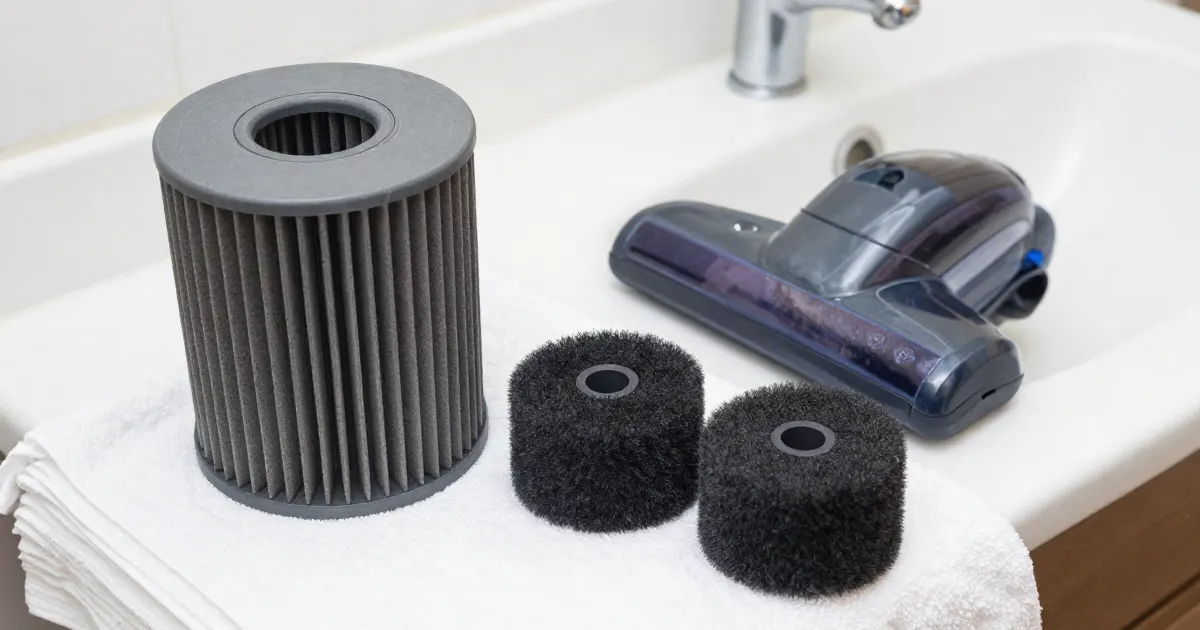
Short answer
The cleaning instructions below cover Samsung Jet Stick washable micro filters, BISSELL 2284, 2389 and 2390 cordless hand vacuum filters, LG CordZero exhaust filters, and Miele Triflex HX2 filters. Samsung, BISSELL and LG describe washing the specified components, with different instructions for water, drying and cleaning intervals. Miele’s HX2 guidelines require dry cleaning for both the pre-filter and the fine dust filter. As a precaution, use only the instructions that match your model, filter and sales region.
As a precaution, switch the vacuum off, unplug its charger before you remove any filter, keep the battery dry, and do not open the battery housing.
Which filter and model your manual covers
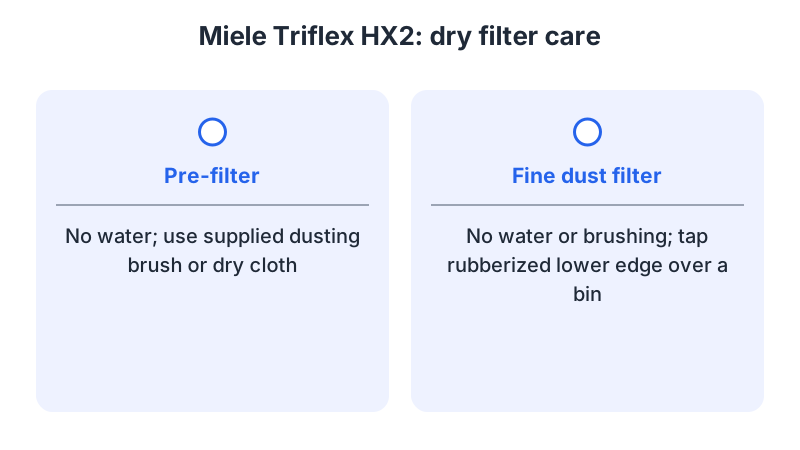
As a precaution, find the full model number on the vacuum or in its manual, match the filter diagram to the parts you have, and compare any replacement’s part reference with the manual before ordering. Miele’s Triflex HX2 guidelines identify two components: a pre-filter and a fine dust filter. They require cleaning both in the specified order and identify the replacement fine dust filter as HX FSF-2. The cleaning tools differ even within that HX2 assembly: the pre-filter can be cleaned with the supplied dusting brush or a dry cloth, while the fine dust filter must not be brushed.
What changes by model
The table groups the covered components by product or range and links to the corresponding manufacturer instructions. The Samsung row summarizes the Australian micro-filter instructions; the US timing is described below. As a precaution, match both the component and the sales region before applying a row.
| Model | Filter the source describes | Water | Drying | Cleaning interval | Source |
|---|---|---|---|---|---|
| Samsung Jet Stick | Washable micro filter | Remove dust, then clean with water after removal | Completely dry in the shade for 24 hours or more | About once a month | Samsung Australia, Samsung US |
| BISSELL 2284, 2389, 2390 cordless hand vacuums | Filter and filter screen cup | Warm water and mild dish soap, after heavy use | Completely dry, 24 to 48 hours | After heavy use | BISSELL support |
| LG CordZero | Exhaust filter | Shake off, or wash in flowing water | Completely dry in the shade | At least once a month | LG support |
| Miele Triflex HX2 | Pre-filter and fine dust filter | Neither filter is cleaned with water | Pre-filter: supplied dusting brush or dry cloth; fine dust filter: careful tapping of its rubberized lower edge, without water or brushing | At least every 3 months | Miele HX2 guidelines |
Samsung Jet Stick
Samsung’s US and Australian pages describe the Jet Stick washable micro filter. The Australian page states that its instructions apply to Australian products and that models or procedures may vary by location or place of purchase. For that micro filter, it says to remove dust and clean with water after removal. It then says to dry the filter completely in the shade for 24 hours or more before reassembly, and it recommends cleaning the filter about once a month. The US page treats the dustbin and the filter together, asking for both to dry completely before the vacuum is reassembled. The US page, Clean and care for your Jet Stick, describes rinsing the dustbin and filter with water, or cleaning the filter under running water. It asks for the filter and the dustbin to dry completely before reassembly, in a shaded area for a total of 24 hours, and suggests cleaning once a month with regular use.
The Australian page also warns that applying heat can cause a product malfunction. As a precaution, keep the washed filter away from heaters, hair dryers and direct sun.
BISSELL 2284, 2389 and 2390
BISSELL’s no or low suction article covers cordless hand vacuum models 2284, 2389 and 2390. For these models, it says to twist the filter to unlock it from the filter screen cup and remove debris from both components. After heavy use, both can be washed with warm water and mild dish soap. They must dry completely for 24 to 48 hours before reinstallation. The washing advice applies to the filter and screen cup after separation; it is tied to heavy use.
LG CordZero
LG’s CordZero exhaust filter page covers the CordZero vacuum range. It gives two options: shake the dust off the exhaust filter, or wash it in flowing water. After washing, it asks for the filter to be dried completely in the shade, because residual moisture can leave an odor. It recommends cleaning the filter at least once a month. The CordZero article notes that its pictures or instructions may differ from the product being serviced. As a precaution, check those details against your CordZero model’s manual before removing the exhaust filter.
Miele Triflex HX2
Miele’s Triflex HX2 maintenance guidelines say to clean both filters thoroughly at least once every 3 months. The guide sets out the steps in a fixed order. It begins with removing the dust container and emptying it over a bin. The lid is then turned beyond its stop until the arrow tips align at the top, and the pre-filter is pulled upward. The fine dust filter is turned counterclockwise through ten 180-degree turns, using the recesses for grip. It is then turned clockwise and removed.
For the fine dust filter, the guide says not to clean it with water, not to brush it, and to avoid cleaning inside it. It asks you to hold the filter over a bin, tap the rubberized lower edge carefully, and turn the filter slightly so the dirt falls free. It warns that incorrect cleaning can damage the fine dust filter and make it less effective.
For the pre-filter, the guide also says not to clean it with water. It suggests the supplied dusting brush or a dry cloth. After cleaning, press the round cap on top of the fine dust filter down into the pre-filter as far as it will go. The guide says to replace the fine dust filter (HX FSF-2) after approximately 3 years.
Cleaning, drying and refitting by model
Samsung’s US Jet Stick instructions describe removal and reassembly of the washable micro filter and dustbin. With the vacuum turned off, the dustbin is released and removed, and the micro filter is lifted out by its handles. After cleaning and complete drying, the dustbin cover is aligned with the release button and its groove. The washable filter fits into the grooves in the cover. The dustbin is then pushed back into the vacuum until it clicks. These are the steps in the Samsung US Jet Stick article.
For BISSELL cordless hand vacuum models 2284, 2389 and 2390, the support article describes fitting the filter into the filter screen cup and twisting it to secure it. The assembly is then inserted securely into the dirt cup, where it should sit flush, without tilting. This reassembly follows the article’s requirement that washed parts dry completely for 24 to 48 hours.
For the Miele Triflex HX2, the guidelines describe dry cleaning and the relationship between the two filter components. After both have been cleaned, the fine dust filter goes back into the pre-filter. Pressing the round cap on top of the fine dust filter down as far as it will go seats it in the pre-filter. The same document directs owners to the HX2 operating instructions supplied in the box for further maintenance steps.
As a precaution, stop if a component will not release as shown in your model’s instructions, keep the vacuum off until every required filter is dry and correctly installed, and check the manual before proceeding with an unfamiliar latch or fitting. As a precaution, if pickup remains weak after reassembly, consult cordless vacuum losing suction; for a separate discussion of replacement decisions, see vacuum filter replacement.
Frequently asked questions
Which cordless vacuum filters can be washed? The sources describe washing for Samsung’s Jet Stick washable micro filter, BISSELL’s filter and filter screen cup for models 2284, 2389 and 2390, and LG’s CordZero exhaust filter. Miele’s guidelines say not to clean the fine dust filter or the pre-filter with water.
How long does a washed filter need to dry? BISSELL’s article gives 24 to 48 hours. Samsung’s pages give 24 hours in the shade, with the Australian page giving 24 hours or more. LG’s page asks for the exhaust filter to be dried completely in the shade.
Why can a washed filter smell? LG’s CordZero page says that, unless the exhaust filter is dried completely, it can smell. Samsung’s US page and BISSELL’s article also ask for the parts to dry completely before they are reinstalled.
What if a filter is damaged? Miele’s guidelines warn that incorrect cleaning can damage the fine dust filter and make it less effective. The same guide says to replace the fine dust filter (HX FSF-2) after approximately 3 years.
How often should the filter be cleaned? Samsung’s Australian page recommends about once a month, and its US page suggests once a month with regular use. LG’s page recommends at least once a month. Miele’s guidelines say both HX2 filters should be cleaned at least every 3 months. BISSELL’s article ties washing to heavy use.
Not sure which guide fits? Use the symptom checker
Checked against
Models checked: Samsung Jet Stick washable micro filter (Australian and US pages); BISSELL 2284, 2389, 2390 filter and filter screen cup; LG CordZero exhaust filter; Miele Triflex HX2 pre-filter and fine dust filter. These are document checks, not hands-on tests.
- Clean and care for your Jet Stick (Samsung US) (support; accessed )
- Cleaning your Jet Stick Dustbin and Filters (Samsung Australia) (support; accessed )
- BISSELL 2284/2389/2390 filter and brush care (support; accessed )
- LG CordZero: How to clean the exhaust filter (support; accessed )
- Miele Triflex HX2 Maintenance Guidelines (manual; accessed )