Cordless Vacuum Making Loud Noise: Symptoms and Model Checks
Short answer
As a precaution, stop a suddenly grinding or unusually loud vacuum, turn it off before disconnecting power for inspection, and treat the sound as a symptom to discuss with support, not a diagnosis of a failed part.
Short answer: manufacturer symptoms and model scope
The manufacturer pages cited here cover vibration, startup noise, abnormal motor or brush noise, cycling noise, power loss, and suction problems. Their model and product scopes are identified below. Samsung’s vibration guidance for Jet series, Bespoke Jet and Powerbot models lists clogged filters, blocked hoses or pipes, debris in the brush roll or wheels, motor or bearing wear, and loose internal components as causes. Tineco’s A10 Essentials page asks whether the noise comes from the main motor or the roller brush. For the brush, it says to clean it and confirm its installation. LG’s stick-vacuum page links cycling noise and loss of power to a clogged nozzle or filter, or to a maintenance reminder. As a precaution, treat the sound as a symptom to match, not a diagnosis of a bearing, motor or battery fault.
Manufacturer checks by symptom
Each row links to its manufacturer page. The scope column distinguishes product families, individual models, and broader vacuum-cleaner guidance.
| Symptom | Model or scope | Documented check | Source |
|---|---|---|---|
| Vibrating sound | Samsung Jet series, Bespoke Jet and Powerbot | Check filters, hoses and pipes, the brush roll and wheels, and fasteners. Test on a flat surface. Contact Samsung Support if the vibration persists. | Samsung vibration guidance |
| Louder sound at switch-on | Samsung vacuum cleaners, UK guidance | The motor starts at a lower speed before it ramps up to full power, and the page calls a louder noise during that start-up normal operation. | Samsung UK strange-noise guidance |
| Persistent loud noise in use | Samsung vacuum cleaners, UK guidance | Check that the dustbin is empty and the filters are clean and correctly fitted. The page links a blocked filter or restricted airflow to the vacuum working harder than normal. | Samsung UK strange-noise guidance |
| Cut-out after overheating | Samsung Jet vacuums | Check the pipe and brush for blockages and clean the filter. Leave the vacuum to cool for a minimum of 5 minutes, up to 30 minutes, after clearing a blockage. | Samsung Jet power guidance |
| Abnormal sound from the main motor | Tineco A10 Essentials | The page asks you to confirm the noise source, and it directs you to Tineco customer service. | Tineco abnormal-noise guidance |
| Abnormal sound from the roller brush | Tineco A10 Essentials | Clean the brush and confirm it is installed in the correct place. The page also directs you to Tineco customer service. | Tineco abnormal-noise guidance |
| Cycling noise or loss of power | LG stick vacuums | Check the nozzle and rotating brush for foreign objects, and clean the filter. Cycling can come from a clogged nozzle or filter, or from a maintenance reminder. | LG stick-vacuum power guidance |
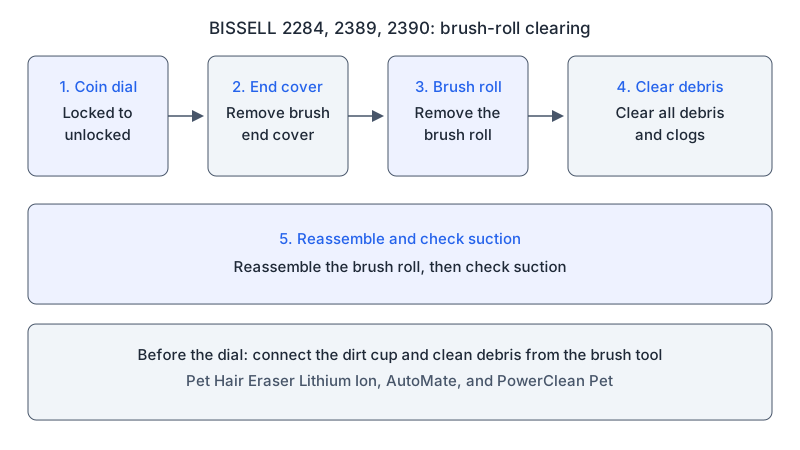
| Brush roll clogged | BISSELL 2284, 2389 and 2390 cordless hand vacuums | Use a coin to turn the dial from locked to unlocked, remove the brush end cover and brush roll, clear all debris and clogs, then reassemble and check suction. | BISSELL brush-roll procedure |
Heat, smell and smoke: inspection precautions
As a precaution, stop using the vacuum and stop charging it if you notice a burning smell, smoke or heat, and contact the manufacturer before further troubleshooting. As a precaution, before an inspection, turn the vacuum off, then disconnect it from its charger or unplug it as applicable; remove a user-removable battery only as directed by the model manual and only when it is safe to handle. As a precaution, never open a lithium battery or a motor casing, and do not run the vacuum to reproduce the sound for a recording.
What changes by model
| Model | Documented noise or check | Source |
|---|---|---|
| Samsung Jet vacuums | Overheating cut-out after blockages, with a 5 to 30 minute cooling period | Samsung Jet power guidance |
| Samsung Jet series, Bespoke Jet and Powerbot | Vibration causes and checks | Samsung vibration guidance |
| Tineco A10 Essentials | Main-motor question leads to customer service; roller-brush check is cleaning and installation | Tineco abnormal-noise guidance |
| LG stick vacuums | Cycling noise and loss of power linked to a clogged nozzle or filter, or to a maintenance reminder | LG stick-vacuum power guidance |
| BISSELL 2284, 2389 and 2390 cordless hand vacuums | Brush-roll clog clearing in the no/low-suction procedure | BISSELL brush-roll procedure |
Samsung
Samsung’s Jet power page says Jet vacuums are designed to cut out when they reach a certain temperature, to prevent damage. It links overheating to blockages in the pipe or brush, and says the issue can sometimes occur after prolonged use of the Extension Crevice Tool. Its check is to inspect the pipe and brush for blockages and clean the filter, then leave the vacuum for a minimum of 5 minutes, up to 30 minutes, after clearing a blockage.
Samsung’s vibration page applies to Samsung Jet series, Bespoke Jet and Powerbot models. It says to turn the vacuum off and then unplug it for safety before checking the filters, hoses and pipes, brush roll, wheels and fasteners.
Samsung’s UK strange-noise page gives guidance for Samsung vacuum cleaners in general. It treats a louder sound at switch-on as normal operation, because the motor starts at a lower speed to help protect it. It links a persistent loud noise to a blocked filter or restricted airflow.
Tineco A10 Essentials
The A10 Essentials abnormal-noise page asks you to confirm whether the noise comes from the main motor, and then whether it comes from the roller brush. For the roller brush, it says to clean the brush and make sure it is installed in the correct place. It directs you to Tineco customer service for the noise it links to the main motor and, after the brush check, when a noise remains.
LG stick vacuums
LG’s stick-vacuum power page links cycling noise or loss of power to a clogged nozzle or filter, and to an indication that maintenance is due. Its checks are to separate the extension wand from the nozzle to look for foreign objects or dust buildup, to remove any foreign object from the rotating brush, and to clean the filter, for which it points to its CordZero filter article. Its battery table names the A9 and A9S. The charging section says to allow 4 hours or more for the battery to fully charge before use. If a replacement battery is unavailable, or the problems persist after cleaning, the page says service may be required.
BISSELL 2284, 2389 and 2390 cordless hand vacuums
BISSELL’s no/low-suction article includes a brush-roll procedure for model numbers 2284, 2389 and 2390, which are cordless hand vacuums. The article identifies them as Pet Hair Eraser Lithium Ion, AutoMate and PowerClean Pet products. It says to connect the dirt cup, clean debris from the brush tool, use a coin to turn the dial from locked to unlocked, and remove the brush end cover to expose the brush roll. The steps then remove the brush roll, clear all debris and clogs, and reassemble the brush roll before checking suction.
Manufacturer checks and inspection precautions
The Samsung vibration page covers filters, hoses and pipes, the brush roll, wheels and fasteners. The Tineco page separates main-motor noise from roller-brush noise. The LG page points to the nozzle, rotating brush and filter. The BISSELL procedure covers the brush roll on the three hand vacuum models. As a precaution, keep hands away from a spinning brush, avoid forcing any part that is cracked, loose or will not seat, and reassemble every filter, bin part and cover before any permitted test.
As a precaution, after the applicable check and complete reassembly, use only a test described for your model, stop if the noise returns, and record the model, attached tool, power mode, sound, and maintenance already completed for a support request. For filter cleaning, see how to clean a cordless vacuum filter. If the main symptom is repeated shutdown, see cordless vacuum keeps cutting out. If the brush is stationary, see brush-bar troubleshooting.
FAQ
What does LG say about cycling noise in its stick vacuums?
LG’s stick-vacuum power page links cycling noise or loss of power to a clogged nozzle or filter, and to an indication that maintenance is due. Its checks are the nozzle and rotating brush for foreign objects, and the filter.
Should I open the motor if it grinds?
As a precaution, keep the motor casing closed. Tineco’s A10 Essentials page asks you to confirm whether the noise comes from the main motor, and it directs you to Tineco customer service.
How long should a Samsung Jet cool after clearing a blockage?
Samsung’s Jet power page says to leave the vacuum for a minimum of 5 minutes, up to 30 minutes, after clearing a blockage.
Not sure which guide fits? Use the symptom checker
Checked against
Models checked: Samsung Jet vacuums; Samsung Jet series, Bespoke Jet and Powerbot; Tineco A10 Essentials; LG stick vacuums (A9/A9S in the battery table); BISSELL 2284, 2389 and 2390 cordless hand vacuums. These are document checks, not hands-on tests.
- How to troubleshoot & resolve a Jet Vacuum power issue (Samsung UK) (support; accessed )
- What to do when the vacuum cleaner makes vibrating sound (Samsung) (support; accessed )
- Why is my vacuum making strange noises? (Samsung UK) (support; accessed )
- Abnormal noise troubleshooting, A10 Essentials (Tineco) (support; accessed )
- LG stick vacuum cleaner troubleshooting power issues (support; accessed )
- BISSELL 2284/2389/2390 filter and brush care (support; accessed )