Cordless Vacuum Not Working? Charging, Cut-Outs, Suction
Short answer
As a precaution, record your model and the indicator location, color and flash pattern during charging or use. The Dyson SV04 manual gives a 1 to 2 hour cooling period for its thermal cut-out procedure; Hoover Excelerate support gives one hour for its overheating pattern. The model table connects these instructions and other documented indicators to their sources.
Symptom guide index
This hub links symptom guides with manufacturer instructions for the named models and product families. The tables cover charging indicators, thermal cut-outs, filter care and runtime figures. As a precaution, record the model printed on your machine, the indicator location and whether the light appeared during charging or use.
| What you observe | What the manufacturer pages say | Detailed guide |
|---|---|---|
| Motor stays silent | Start-up and charge patterns differ by brand; see the model rows below. | Won’t turn on |
| Charging looks wrong | Charger-side lights differ by brand; see the model rows below. Tineco LITEVAK: solid blue means fully charged. | Not charging |
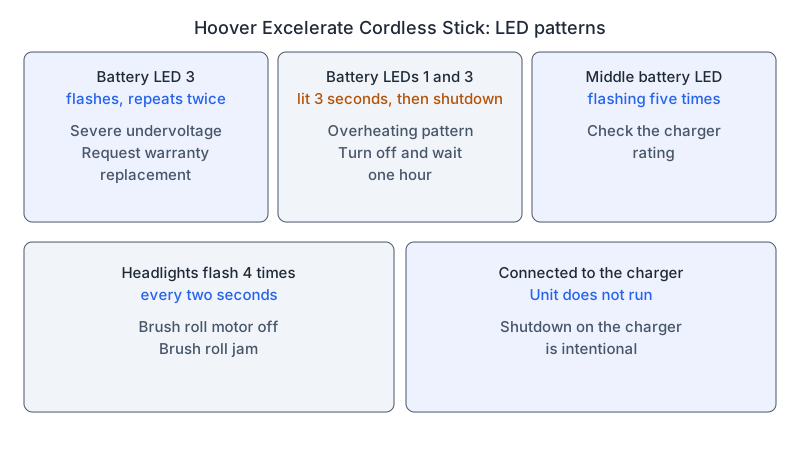
| Pulsing or cutting out | Dyson SV04: the thermal cut-out resets automatically; the manual specifies 1 to 2 hours of cooling before checking the filter or blockages. Hoover Excelerate Cordless Stick: its overheating pattern calls for turning the unit off and waiting one hour. | Keeps cutting out |
| Steady motor, poor pickup | Tineco LITEVAK: the filter can be washed and must be fully dry before refitting. Samsung Bespoke Jet: four modes, with MID as the default. | Losing suction |
| Brush bar not turning | Hoover Excelerate Cordless Stick: headlights flashing four times every two seconds with the brush roll motor off indicate a brush roll jam. | Brush bar not spinning |
| Charged, but runtime is short | Samsung Bespoke Jet: its support page lists about 3.5 hours to charge each battery and up to 2 hours of use. Tineco LITEVAK: 12 to 40 minutes per battery with non-electric accessories. eufy HomeVac S11: 8, 25 or 40 minutes after a full charge, depending on mode. | Battery not lasting |
| Flashing or colored light | Tineco LITEVAK: a rapidly blinking red indicator calls for charging the battery. Dyson SV04: a flashing red battery indicator during use means a fault to report to Dyson. | Light meanings or flashing red |
| Noise or smell | As a precaution, record when it appears, and stop using a machine that smells hot or looks damaged. | Noise or smell |
| Stops after a hot run | Cooling and thermal shutdown are covered separately. | Vacuum overheating |
| A wet dry vacuum mop streaks, leaks, stops spraying, will not self-clean, will not charge, shows an error light or its roller stops | Related floor washer guides are linked here by symptom. | Floor washer hub: streaks, not picking up water, not spraying, self-cleaning, roller, not charging, leaking or error lights |
The table routes you to a symptom. The brand-specific figures are in What changes by model.
Observations for a model-specific support request
As a precaution, note these before you buy a battery, filter or brush: the model printed on the machine and any variant named in its manual; the light state on the approved charger, and the state when you press start after disconnecting; whether the motor runs steadily, pulses or never starts; and whether poor pickup happens with every tool, or with one floor head alone.
As a precaution, use the no-name cordless guide to document behavior when the model is uncertain, and ask the seller to identify the matching manual. As a precaution, keep any recorded light code attached to the machine on which you observed it.
What changes by model
| Brand and model | What the manufacturer page documents | Source |
|---|---|---|
| Samsung Bespoke Jet | Two batteries, each about 3.5 hours to charge for up to 2 hours of use, and swappable for continuous cleaning. Modes MIN, MID, MAX and JET, with MID as the default. The WET cycle needs the Wet Brush attachment. | Samsung support (US) |
| Samsung Clean Station | The station’s indicator signals when the dust bag needs replacing. The bag is designed for more than three months of use. | Samsung support (US) |
| LG CordZero vacuum | One blinking LED means low battery; three lit means fully charged. Charge indoors. Charging may not be possible below 5°C, and battery life may shorten after long use below 5°C or above 38°C. | LG help library (US) |
| Hoover Excelerate Cordless Stick | The start-up pattern is covered in the Won’t turn on guide. For the LED 3 pattern repeating twice, Hoover recommends requesting warranty replacement for severe undervoltage. Battery LEDs 1 and 3 lit for three seconds, followed by shutdown: turn off and wait one hour for cooling. Middle battery LED flashing five times: check the charger rating. | Hoover support library |
| Tineco LITEVAK Cordless Stick | Initial charge of 3 to 4 hours; solid blue when fully charged; a rapidly blinking red indicator means the battery is out of power, so charge as soon as possible. 12 to 40 minutes per battery with non-electric accessories. | Tineco FAQ (US) |
| eufy HomeVac S11 | Quick discharge is linked to a battery running low, a battery not charged properly, or a vacuum that is clogged or has sucked in liquids. The original AC adapter (30V, 800mA) gives a full charge in 3.5 hours. After a full charge: Max (20 kPa) 8 minutes, Medium (12 kPa) 25 minutes, Low (7 kPa) 40 minutes. | eufy support article |
| Dyson SV04 | In use: flashing blue means no power; flashing amber means a temporary fault; flashing red means a fault to report to Dyson. While charging: flashing blue means not charging. Start-up and charge checks are in the Won’t turn on guide. | Dyson manual, US (204484-01) |
Samsung Bespoke Jet Cordless Stick Vacuum
The Samsung support page (US) covers Bespoke Jet charging, cleaning modes, attachments and the Clean Station. Samsung notes that settings, options and instructions can vary by model and directs owners to their user manual. The figures in this hub reproduce that support page’s scope. As a precaution, match the model and supplied battery configuration to your manual when comparing a runtime observation with those figures.
LG CordZero vacuum
The LG help library page (US) addresses the CordZero vacuum family. Its charging and temperature guidance is presented here at that family level. As a precaution, record the model number, the number of illuminated LEDs and whether they are steady or blinking when asking LG for a procedure matched to your vacuum.
Hoover Excelerate Cordless Stick
The Hoover support library page describes shutdown while connected to the charger as intentional for the Excelerate Cordless Stick. As a precaution, record whether an observed light pattern occurred with the charger attached.
Tineco LITEVAK Cordless Stick Vacuum
The Tineco FAQ (US) says the filter can be washed and must be dried completely before it goes back in, and that the HEPA filter is cleaned every 3 months.
eufy HomeVac S11
The eufy support article asks HomeVac S11 owners to check the metal pins on the main unit and battery. It associates a flashing red indicator with possible previous liquid intake or an internal clog. As a precaution, give eufy the observed light pattern and any known liquid exposure when requesting the procedure for your machine.
Dyson SV04
The Dyson operating manual, US covers SV04; 204484-01 identifies the linked document. The manual states that the machine switches off when battery temperature is below 37.4°F (3°C). Its diagnostic diagrams distinguish the main body from the battery. As a precaution, identify the indicator location as well as its color and flashing speed when comparing your observation with these diagrams.
Links for the symptom you observed
Pulsing or repeated stops: the Dyson manual describes a thermal cut-out and a cooling period before checking blockages. As a precaution, use the cutting-out guide alongside the instructions for your model.
As a precaution, for a steady motor with weak pickup, record whether the problem concerns airflow or the floor head picking up debris, then consult loss of suction or brush-bar checks alongside your model’s instructions.
As a precaution, for charging or runtime concerns, record the light pattern, selected mode, attachment and elapsed operating time when the problem occurs. The eufy HomeVac S11 article asks owners to confirm use of the original AC adapter. As a precaution, consult not charging for charge-state questions and short runtime for operating-time questions alongside the matching manual.
As a precaution, match the filter type and washing instructions in your manual when using cleaning a cordless vacuum filter. Related guide indexes include the handheld guide and the corded vacuum hub.
Battery heat and safety limits
The Dyson SV04 manual advises avoiding recharging immediately after a full discharge and allowing the machine to cool for a few minutes. Its battery caution reads: “Do not disassemble, short contacts, heat above 140°F (60°C), or incinerate.” As a precaution, keep the battery pack and motor housing closed, and use the charger specified for your model.
Matching instructions to your model
As a precaution, match the manufacturer, model or named product family, indicator location and operating state to the instructions you plan to follow. As a precaution, include the battery and charger references in a support request, together with the pattern you observed, the attachment in use and the time until the symptom appeared. As a precaution, ask the manufacturer or seller for a procedure tied to that information before replacing parts or attempting a reset.
Frequently Asked Questions
Why does my cordless vacuum keep cutting out or pulsing?
The model rows above give each manual’s cooling period, and the cutting-out guide covers the sequence. As a precaution, compare the observed behavior with the instructions for your model when using these examples.
What does a flashing light mean?
The meaning of a flashing light depends on the model and on whether it appeared during charging or use, so read the model rows above. As a precaution, match the model, indicator location, operating state and complete flashing pattern to the corresponding source before interpreting a light.
Not sure which guide fits? Use the symptom checker
Checked against
Models checked: Samsung Bespoke Jet Cordless Stick Vacuum (US support page); LG CordZero vacuum (US help library page); Hoover Excelerate Cordless Stick (support library page); Tineco LITEVAK Cordless Stick Vacuum (US FAQ); eufy HomeVac S11 (support article); Dyson SV04 (US operating manual, document 204484-01). These are document checks, not hands-on tests.
- Samsung support: Use your Bespoke Jet Cordless Stick Vacuum (support; accessed )
- LG support: CordZero vacuum not powering on (US help library) (support; accessed )
- Hoover support: Excelerate Cordless Stick LED lights (support; accessed )
- Tineco support: LITEVAK Cordless Stick Vacuum FAQ (US) (support; accessed )
- eufy support: What should I do if my HomeVac S11 discharges quickly (support; accessed )
- Dyson SV04 operating manual, US (document 204484-01) (manual; accessed )