Wet Dry Vacuum Mop Not Charging? Check the Dock Contacts
Short answer
Match the checks to your model: Tineco iFloor 3, FLOOR ONE S7 Pro, FLOOR ONE S7 Master, eufy WetVac W31 or Roborock Dyad WD1S1A. For an unresponsive Tineco display, check seating, unplug the adapter before cleaning the pins, use the original adapter and allow about an hour to cool. For the W31, follow the base and self-cleaning checks below; for the Dyad, check its position and charging contacts.
Wet dry vacuum mop not charging: checks by model
-
Check 1
Does your Tineco iFloor 3 display stay unresponsive on its charging base?
Yes
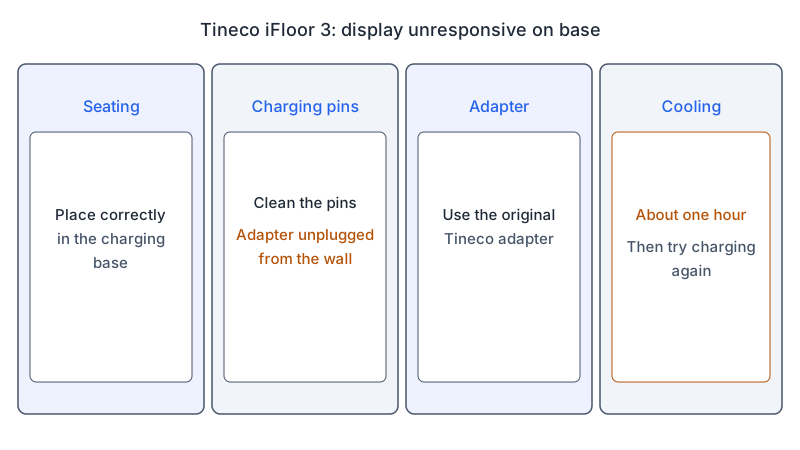
Check seating, unplug the adapter before cleaning the pins, use the original Tineco adapter, and let the unit cool for about one hour.
No
-
Check 2
Does charging on your Tineco iFloor 3 take longer than expected?
Yes
Let the unit cool down for about one hour, then try charging again.
No
-
Check 3
Does your eufy WetVac W31 fail to charge or power on?
Yes
Reconnect the base, check the handle, and try the W31 self-cleaning check below; if needed, clean its pins with a dry cloth.
No
-
Check 4
Does your Roborock Dyad WD1S1A fail to charge when docked?
Yes
Check upright placement and the dock and body contacts. The Charging voice alert confirms placement when voice alerts are turned on.
No
None of these?
If the checks for your model do not restore charging, contact its manufacturer. For the WetVac W31, eufy asks for a video of the issue.
The short answer
All three brands name the charging base or dock contacts as a check, so start there. On the Tineco iFloor 3, FLOOR ONE S7 Pro and FLOOR ONE S7 Master, confirm the unit sits correctly in its base and clean the charging pins with the adapter unplugged from the wall. On the eufy WetVac W31, reconnect the adapter and base, then clean the metal pins on the base and the vacuum. On the Roborock Dyad WD1S1A, place the vacuum upright in the dock and check the contacts on the dock and the body.
Use only the section for your model. Each source names its own models, and a step that one page gives for one model is not assumed for another. Identify the model on your machine before following a button sequence or buying a replacement.
Identify what is failing
Note the exact symptom before you start. The Tineco pages cover two cases: a display that does not react on the base, and a charge that takes longer than expected. The eufy article covers a W31 that does not charge or power on. The Roborock manual covers a vacuum that does not charge when docked. These are different checks, so run only the ones that match your symptom.
The checks in the sources, ordered by how little effort each one takes:
- Seating on the base or in the dock.
- The charging contacts: the pins on the Tineco and eufy units, and the contacts on the Roborock dock and body.
- The power supply: the original Tineco adapter, the eufy adapter and base, or the power supply supplied with the Roborock.
- Cooling for about one hour, which the Tineco pages name.
- Contacting the manufacturer; for the WetVac W31, eufy asks for a video of the issue.
This order reflects how little each check takes. It does not rank how often each cause occurs.
For spray or pickup faults on the same machine, use the troubleshooting hub to find the right guide. If the machine charges but runs for a short time, the battery guide for cordless vacuums covers that case.
What changes by model
The table lists what each source names for each model. A row covers only the model in that row.
| Model | Charging check the source describes | Source |
|---|---|---|
| Tineco iFloor 3 | Display unresponsive: check seating in the base, clean the pins with the adapter unplugged from the wall, use the original Tineco adapter, cool about one hour. Charging too long: cool about one hour | Tineco iFloor 3 troubleshooting |
| Tineco FLOOR ONE S7 Pro | Display unresponsive: the same four steps as the iFloor 3 page. Charging too long or out of specification: cool about one hour | Tineco FLOOR ONE S7 Pro troubleshooting |
| Tineco FLOOR ONE S7 Master | Display unresponsive: the same four steps as the iFloor 3 page. Charging too long: cool about one hour | Tineco FLOOR ONE S7 Master troubleshooting |
| eufy WetVac W31 | Reconnect the adapter and base to see whether the LED display lights; check the handle clicks in; with enough clean water in the tank, press self-cleaning and check whether self-cleaning and self-drying start; clean the metal pins with a dry cloth | eufy WetVac charging article |
| Roborock Dyad WD1S1A | Place upright in the dock; the Charging voice prompt confirms placement when voice alerts are on; if it does not charge, check the contacts on the dock and the body | Roborock Dyad user manual (CE/EN) |
Tineco: iFloor 3, FLOOR ONE S7 Pro and FLOOR ONE S7 Master
The Tineco support pages for the iFloor 3, the FLOOR ONE S7 Pro and the FLOOR ONE S7 Master each carry a Not charging / Charging status is abnormal entry with two checks. The first asks whether the display responds at all. On the iFloor 3 page, a display that does not react calls for four steps: make sure the unit is placed correctly in the charging base; clean the charging pins with the adapter not connected to the wall socket; use the original Tineco adapter; and cool the unit down for about one hour. The S7 Pro and S7 Master pages list the same four steps for their own models.
The second check covers charging that takes longer than expected or goes beyond specification. On each page, the answer is the same one-hour cooling step.
The Tineco pages also warn that, unless a step tells you to, you should not press the trigger while checking any part of the machine.
eufy WetVac W31
The eufy article covers the W31 when it does not charge or power on. The following checks are selected from the article, in their original order. Reconnect the adapter and the charging base, then check whether the LED display lights up. Check that the handle bar is installed correctly; the article describes a clicking sound when it is. Place the vacuum on the charging base with enough clean water in the clean water tank and press self-cleaning, then check whether self-cleaning and self-drying start. Clean the metal charging pins on the base and on the bottom of the vacuum with a clean, dry cloth.
If none of this restores charging, the article asks you to email eufy support with a video of the problem.
Roborock Dyad WD1S1A
The Roborock manual for the WD1S1A, in its CE/EN edition, says to place the vacuum upright into the charging dock. The voice prompt “Charging” indicates that it has been placed securely. Voice alerts can be turned on or off by pressing Clean and Change Language/Mode for three seconds in standby, so the prompt confirms placement only when alerts are on.
The common-issues table covers a vacuum that does not charge when docked. Its solution is to check the charging contacts on the charging dock and the corresponding part on the body. The specification table gives a charging time of less than four hours.
The manual also says: “This product can only be charged using a S036-1A256140HA or S036-1A256140HE power supply provided with the product.” It warns against third-party batteries, power adapters and docks, and against charging the vacuum or installing the dock near heat sources or in humid areas such as radiators or bathrooms.
Practical checks for the charging path
Run only the checks that match your model and your symptom.
- Seating. On the Tineco iFloor 3, FLOOR ONE S7 Pro and FLOOR ONE S7 Master, place the unit correctly in the charging base. On the Roborock Dyad WD1S1A, place it upright in the dock.
- Contacts. On the Tineco units, clean the charging pins with the adapter unplugged from the wall. On the eufy WetVac W31, clean the metal charging pins on the base and on the bottom of the vacuum with a clean, dry cloth. On the Roborock Dyad WD1S1A, check the charging contacts on the dock and the corresponding part on the body.
- Adapter. On the Tineco units, use the original Tineco adapter. On the eufy WetVac W31, reconnect the adapter and the base. On the Roborock Dyad WD1S1A, use only the supplied power supply.
- Cooling. The Tineco pages name a cooling step: let the unit cool down for about one hour when the display does not react or charging takes too long.
- Caution. The Roborock manual says not to disassemble, repair or modify the battery, the power adapter or the dock. The Tineco pages say not to press the trigger while checking the machine unless a step tells you to.
When to contact the manufacturer
If the checks for your model do not restore charging, contact the manufacturer with the model number and the symptom. For the eufy WetVac W31, the article asks you to email eufy support with a video of the issue. The Roborock manual gives after-sales support contacts by region: support@roborock-eu.com for Europe and service@roborock.com.au for Australia.
Questions readers ask
Can I use a different charger? The Roborock manual says not to use third-party power adapters or docks, and it names the two supplied power supply models. The Tineco iFloor 3, FLOOR ONE S7 Pro and FLOOR ONE S7 Master pages each say to use the original Tineco adapter.
Should I let the unit cool before charging again? The Tineco pages say to cool the unit down for about one hour when the display does not react or when charging takes longer than expected.
How should I store the machine between uses? The Roborock manual says that if the vacuum will not be used for an extended period, you should fully charge it, unplug its power supply, and place it in a cool and dry place. It also says to recharge it at least once every three months to avoid over-discharging the battery.
For a dry cordless vacuum rather than a wet floor washer, use the cordless vacuum charging guide.
Not sure which guide fits? Use the symptom checker
Checked against
Models checked: Tineco iFloor 3; Tineco FLOOR ONE S7 Pro; Tineco FLOOR ONE S7 Master; eufy WetVac W31; Roborock Dyad WD1S1A. These are document checks, not hands-on tests.
- Tineco Support: Troubleshooting Guide for iFloor 3 (Not charging / Charging status is abnormal) (support; accessed )
- Tineco Support: Troubleshooting Guide for FLOOR ONE S7 Pro (Not charging / Charging status is abnormal) (support; accessed )
- Tineco Support: Troubleshooting Guide for FLOOR ONE S7 Master (Not charging / Charging status is abnormal) (support; accessed )
- eufy: What should I do if my WetVac does not charge or power on (support; accessed )
- Roborock Wet and Dry Vacuum Cleaner User Manual (WD1S1A, CE EN, PDF) (manual; accessed )