Handheld Vacuum Troubleshooting: Charging and Pickup
Short answer
As a precaution, match your full model code and symptom to the manufacturer instructions below before charging or cleaning your vacuum.
Model identification
As a precaution, record the full vacuum model code, charger reference and wet/dry designation. The BLACK+DECKER manual covers NVB115W, NVB115WA, NVB215W and NVB215WA for dry pickup, and WDB115W, WDB115WA, WDB215W and WDB215WA for wet/dry pickup. Here, NVB and WDB refer to those listed models.
As a precaution, stop using and charging a dry-pickup vacuum exposed to liquid, or any unit with a damaged or unusually hot battery or charger. As a precaution, do not run it to dry the inside, open the battery or motor housing, or bridge contacts.
Checks for specific models and symptoms
The entries below group manufacturer instructions by model and symptom.
- Charging indicator stays off (eufy H11 and H11 Pure). eufy identifies the port, cable, charger and outlet as possible causes. It asks you to inspect the USB port and connector prongs, try another Micro USB cable and charger, then another outlet.
- Three indicators flashing together during charging after use (eufy H11 and H11 Pure). If the vacuum has just been used, eufy says to retry charging 30 minutes later. For persistent charging trouble, it requests a video of the indicators after pressing On-Off.
- Charging procedure (BISSELL 2284, 2389 and 2390). BISSELL specifies the OFF position and eight hours for a full charge. The light blinks red while charging and turns green when charged.
- Charging procedure (BLACK+DECKER NVB/WDB 115/215). The manual says to switch off, place the vacuum on its charging bracket, plug in the charger, turn on power at the outlet and charge for at least 21 hours. Before initial use, it specifies at least 24 hours.
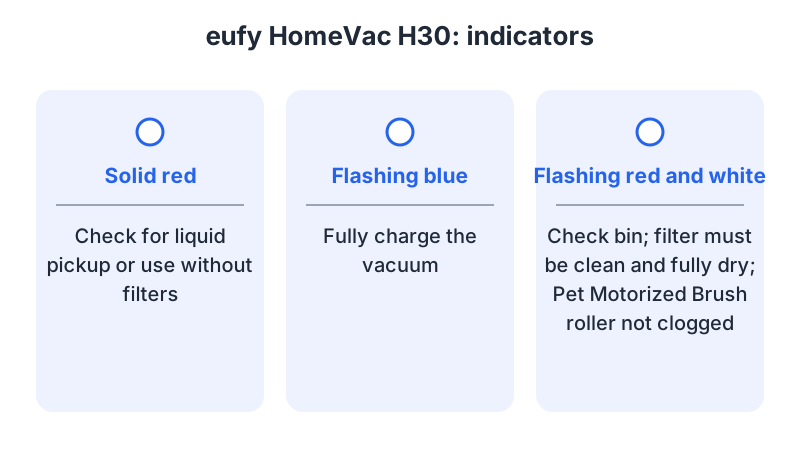
- Flashing blue indicator (eufy H30). eufy advises fully charging the vacuum to check whether this resolves a shutdown during vacuuming.
- Alternating red and white flashes (eufy H30). The article asks you to check the dust bin, filter cleanliness and dryness, and the Pet Motorized Brush roller for clogs.
- Solid red indicator (eufy H30). eufy asks whether liquid was picked up or the vacuum was used without filters. As a precaution, stop using and charging a liquid-exposed H30 and contact eufy before resuming.
- Blinking red and green, or no power (BISSELL 2284, 2389 and 2390). BISSELL’s charging article directs you to support. If the vacuum runs for a few seconds then stops, and its light is solid green during charging, it directs you to brush-not-turning troubleshooting.
Model-specific procedures and related guides
As a precaution, record the symptom, indicator pattern, charger reference and recent maintenance for support. As a precaution, stop use if liquid leaks or reaches electrical parts, and report the exposure.
As a precaution, inspect the unplugged charger and confirm its model compatibility and input voltage before connecting it. The BLACK+DECKER manual identifies charger S003AQ 15 for the listed NVB/WDB models.
As a precaution, switch off before filter maintenance. BISSELL’s article covers filter and brush care for models 2284, 2389 and 2390. The filter care guide compares washing and drying instructions by model.
What changes by model
The table compares documented procedures and symptoms for the named models.
| Model | Charging instructions or checks | Other instructions or checks | Source |
|---|---|---|---|
| BLACK+DECKER NVB/WDB 115/215 | Switch off, place on bracket, use charger S003AQ 15; charging section: at least 21 hours at 10–40 °C (50–104 °F); initial use: at least 24 hours | Empty liquid and dry the appliance thoroughly before charging. NVB: dry pickup | manual |
| BISSELL 2284, 2389, 2390 | Switch off, plug the charger into the machine, eight hours to a full charge | Charge light blinks red during charging and turns green when full. Blinking red and green, or no power: contact BISSELL | charging article |
| eufy HomeVac H11 / H11 Pure | Indicator stays off: inspect port and connector; try another cable, charger and outlet | Three indicators flashing together during charging just after use: retry after 30 minutes | support article |
| eufy HomeVac H30, shutdown during vacuuming | Flashing blue: fully charge and check operation | Solid red: check for liquid pickup or use without filters. Alternating red/white: check bin, filter and Pet Motorized Brush roller | support article |
BLACK+DECKER NVB/WDB 115/215
The UAE-hosted English manual gives at least 21 hours in its charging procedure and approximately 10 hours in its technical table. As a precaution, ask BLACK+DECKER to confirm the charging time for your model and regional charger.
BISSELL 2284, 2389 and 2390
BISSELL’s charging article says that, ten minutes after full charge, the green light flashes once per minute. The filter and brush article covers the same models.
eufy HomeVac H11 and H11 Pure
eufy’s article covers charging checks for both models, including a 30-minute retry when all three indicators flash together during charging just after use.
eufy HomeVac H30
eufy’s article addresses shutdown during vacuuming. For a persistent problem, it requests a video showing the issue.
Filters and blockages
For the listed NVB/WDB models, BLACK+DECKER allows washing dust bowls and filters in warm soapy water and requires complete drying before refitting. It specifies filter replacement every six to nine months and whenever worn or damaged: FLVD10-XJ for NVB, FLVWD10-XJ for WDB. It requires filters during use. For WDB, it requires cleaning the appliance and filter immediately after liquid pickup because mold and mildew may form.
For models 2284, 2389 and 2390, BISSELL says to twist the filter out of its screen cup and remove debris. After heavy use, both parts can be washed with warm water and mild dish soap, then must dry completely for 24 to 48 hours before refitting. A rubber flap pushed into the tool channel reduces suction; the article directs you to push it back inside the dirt cup.
For the brush roll, the article says to use a coin to turn the dial to the unlocked position, remove the brush end cover and the brush roll, clear debris and clogs, and check suction after reassembly.
For alternating red and white flashes on the H30, eufy asks you to check filter cleanliness and dryness and the dust bin. For a clogged Pet Motorized Brush roller, it directs you to clean it and check operation.
Liquid, safety and charging limits
For the listed NVB/WDB models, BLACK+DECKER specifies charging at 10–40 °C (50–104 °F) after emptying liquid and drying the appliance thoroughly. The manual prohibits wet pickup with these NVB units.
As a precaution, stop using and charging a unit with a damaged battery or charger or liquid in electrical parts, and report the exposure to the manufacturer. As a precaution, do not charge a swollen, hot or leaking battery.
Frequently asked questions
How long should a BLACK+DECKER NVB or WDB 115/215 charge?
The manual says to leave the appliance on the bracket, switched off, for at least 21 hours. It also asks for at least 24 hours of charging before the appliance is put into use for the initial time.
Can a BISSELL 2284, 2389 or 2390 charge while switched on?
BISSELL’s charging article specifies charging with the machine in the OFF position; a full charge takes eight hours.
What should I check if my eufy HomeVac H30 stops with a solid red light?
eufy asks whether liquid was picked up or the vacuum was used without filters. As a precaution, stop using and charging a liquid-exposed H30 and contact eufy before resuming.
Model documentation
As a precaution, ask the retailer for model documentation using purchase records and product photos. As a precaution, confirm charger compatibility with the manufacturer. The unknown cordless model guide includes an identification record.
As a precaution, follow the model manual for reassembly and testing after maintenance. As a precaution, report persistent symptoms and indicator patterns to support, and confirm any battery replacement or reset procedure with the manufacturer.
Not sure which guide fits? Use the symptom checker
Checked against
Models checked: BLACK+DECKER NVB/WDB 115/215; BISSELL 2284/2389/2390; eufy HomeVac H11 / H11 Pure; eufy HomeVac H30. These are document checks, not hands-on tests.
- BLACK+DECKER NVB/WDB 115/215 manual (manual; accessed )
- BISSELL 2284/2389/2390 charging (support; accessed )
- BISSELL 2284/2389/2390 filter and brush care (support; accessed )
- What if my HomeVac H11/HomeVac H11 Pure does not charge? (eufy) (support; accessed )
- What to do if HomeVac H30 stopped working while vacuuming (eufy) (support; accessed )