Laresar Evol 3 Troubleshooting: Brush Noise, Errors, Wi-Fi
Short answer
For abnormal noise during cleaning, the Laresar Evol 3 manual says to stop the robot and clear foreign objects from the roller brush, side brushes and wheels; Error 9 means the main brush is stuck or entangled. A red indicator light means an error, and the manual gives a fix for each of Error 1 to Error 9. The Evol 3 joins only 2.4 GHz Wi-Fi and cannot work below 15% battery.
Laresar Evol 3 noisy or stopped: checks from the manual
-
Check 1
Is there abnormal noise while it cleans?
Yes
Stop it, power it off and clear foreign objects from the roller brush, side brushes and wheels.
Open guide: Robot Vacuum Making Loud NoiseNo
-
Check 2
Is the indicator light red with an error number?
Yes
Match Error 1 to Error 9 in the manual table; Error 9 means the main brush is stuck or entangled.
Open guide: Robot Vacuum Error CodesNo
-
Check 3
Does it fail to power on or to charge?
Yes
Set it on the dock aligned with the charging electrode, check the dock light and both adapter ends, then clean the contacts.
No
-
Check 4
Does it fail to connect to Wi-Fi?
Yes
Use a 2.4 GHz network with a good signal, check the password, reset the Wi-Fi settings and update the app.
Open guide: Robot Vacuum Won't Connect to Wi-FiNo
None of these?
If it still fails, email Laresar: [email protected] (Evol 3 manual) or [email protected] (troubleshooting page).
When a Laresar Evol 3 makes abnormal noise during cleaning, its manual points to foreign objects caught in the roller brush, the side brushes or the wheels: stop the robot and clean them. The same manual lists Error 1 to Error 9 and fixes for a robot that will not power on, charge, return to its dock or join Wi-Fi.
How to fix a Laresar Evol 3 robot vacuum that makes abnormal noise: step by step
- Pause the robot and power it off. A short press on the Clean/
Power button pauses cleaning, and holding it for 3 seconds powers the robot off. The manual says the robot cannot be powered off while it is charging, and asks for cleaning and maintenance with the machine powered off. - Take out the roller brush. Flip the robot over, press the buckle on the roller brush cover, lift the cover off and remove the roller brush.
- Clean the brush and its cavity. Use the cleaning brush supplied with the robot to remove dust from the main brush and the roller brush cavity, then clear anything wrapped around the roller brush. The manual recommends this cleaning weekly.
- Check the side brushes and the wheels. Pull the side brushes straight out, remove hair and dirt, and press them back with L and R matching the letters on the bottom cover; remove any foreign objects from the wheels.
- Refit the brush and restart. Put the roller brush and cover back, then hold Clean/
Power for 3 seconds. If the robot reports Error 9: Main Brush is Stuck, check the roller brush again; for other abnormal behavior the manual says to power it off and on again. - Stop and contact Laresar if the noise or the error comes back. The manual says not to disassemble, repair or modify the battery or dock without permission. Email [email protected] (printed in the Evol 3 manual) or [email protected] (Laresar’s troubleshooting page).
How other brands document the same symptom is compared in the robot vacuum making loud noise guide.
Laresar Evol 3 errors and faults: what the manual says
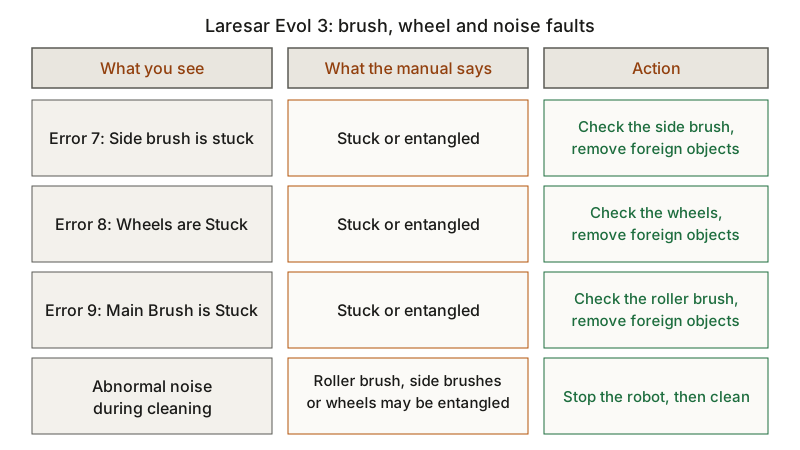
On the Evol 3, the indicator light is blue in normal use and red for an error. Each row below comes from the Evol 3 manual; other brands’ codes are in the robot vacuum error codes guide.
| Error or symptom | What the manual says | Action | Source |
|---|---|---|---|
| Error 1: Insert dustbin | Cleaning started with the dust box taken out | Reinstall the dust box | Evol 3 manual |
| Error 2: Put the vacuum on the floor before starting | Robot picked up or suspended in the air | Move it to level ground and start again | Evol 3 manual |
| Error 3: Put the machine flat on the ground before starting | Robot tilted | Move it to level ground before starting | Evol 3 manual |
| Error 4: Front bumper is stuck | Edge or anti-collision sensor stuck | Push the bumper left and right to confirm it moves freely | Evol 3 manual |
| Error 5: Battery is low, please recharge | Battery low | Put the robot on the dock to charge | Evol 3 manual |
| Error 6: The vacuum is stuck | Robot stuck | Move it to open ground before starting | Evol 3 manual |
| Error 7: Side brush is stuck | Side brush stuck or entangled | Check the side brush and remove foreign objects | Evol 3 manual |
| Error 8: Wheels are Stuck | Wheels stuck or entangled | Check the wheels and remove foreign objects | Evol 3 manual |
| Error 9: Main Brush is Stuck | Roller brush stuck or entangled | Check the roller brush and remove foreign objects | Evol 3 manual |
| Abnormal noise during cleaning | Roller brush, side brushes or wheels may be entangled | Stop the robot, then clean them | Evol 3 manual |
| Will not power on | Battery too low, or room below 32°F (0°C) or above 104°F (40°C) | Set it on the dock aligned with the charging electrode so it powers on; use it between 32°F and 104°F | Evol 3 manual |
| Will not charge | Dock not powered, or poor contact between dock and robot | Check that the dock light is on and both adapter ends are connected; clean the dock contacts and the robot’s charging contact, or push the side brush to one side | Evol 3 manual |
| Will not return to the dock | Robot too far from the dock | Place it near the dock | Evol 3 manual |
| Cleaning worse, or dust dropped | Filter blocked, dust box full or roller brush entangled | Clean or replace the filter, empty the dust box, clean the roller brush | Evol 3 manual |
What changes by model
Everything on this page comes from the Laresar Evol 3 manual, whose specification table names the product model as Evol 3. Laresar also sells an Evol 3s as a separate product, so read the model name on the robot’s label and download the manual for that exact model from Laresar’s manuals page, which lists the Evol 3 manual in English, Spanish, French, Italian, German and Japanese.
Indicator light
Besides blue for normal and red for an error, the Evol 3 light blinks blue while it connects to a network and flashes purple while it looks for a robot. The Reset button is pressed with a needle.
Charging and battery
The Evol 3 has a 3200 mAh, 14.4V battery with a 300-minute charging time, and its dock is rated 19V 0.6A. Below 15% the robot cannot work or start a scheduled clean, and under 15% mid-clean it returns to the dock. The manual asks you to keep it charging in daily use, to charge it at least once every 3 months in storage, and to use no third-party batteries, docks or chargers.
Dock placement
Set the dock on a flat floor against a wall, with more than 0.5 m (about 1.6 ft) clear on each side and 1.5 m (about 4.9 ft) in front. The manual warns that direct sunlight may interfere with the return-for-charging signal, and that a power cord hanging down to the floor may be dragged by the robot and cut power to the dock. It recommends cleaning the dock’s signal transmission zone, the infrared anti-collision sensor and the cliff sensor monthly.
Wi-Fi and app
The Evol 3 supports only the 2.4 GHz band. For a failed connection the manual lists a weak signal, an abnormal connection (reset the Wi-Fi settings, install the latest app version and reconnect) and an incorrect password. Laresar’s troubleshooting page lists Evol 3 videos on connecting to the app and to Alexa. Router-side checks for other brands are in the robot vacuum won’t connect to Wi-Fi guide.
Filters and brushes
The prefilter and dust box can be rinsed with clean water and no detergent, but the HEPA filter cannot be washed with water. Dry the filters for at least 24 hours; the manual recommends replacing a set of filters and the side brushes every 3 months.
For a budget robot without a manual, see the no-name robot vacuum troubleshooting guide.
Frequently asked questions
Why is my Laresar Evol 3 main brush making noise?
The Evol 3 manual links abnormal noise during cleaning to foreign objects tangled in the roller brush, side brushes or wheels. Stop the robot, remove the roller brush, clean it and its cavity with the supplied brush, and check the side brushes and wheels. Error 9: Main Brush is Stuck points to the roller brush as well.
What does the red light on a Laresar Evol 3 mean?
The manual lists a red indicator light as an error. Match the error number to the table above: Error 9 means the main brush is stuck or entangled.
Why won’t my Laresar Evol 3 connect to Wi-Fi?
The Evol 3 joins only 2.4 GHz networks. The manual also lists a weak Wi-Fi signal, an incorrect password and an abnormal connection, for which it says to reset the Wi-Fi settings, install the latest app version and connect again.
Not sure which guide fits? Use the symptom checker
Checked against
Models checked: Laresar Evol 3. These are document checks, not hands-on tests.
- Laresar Evol 3 robot vacuum user manual (EN) (manual; accessed )
- Laresar troubleshooting (support; accessed )
- Laresar user manuals (support; accessed )