Roomba Error Codes: What Each One Means by Series
Short answer
A Roomba error number means different things on different series, so match it to the iRobot chart for your model: on the i and s Series, Error 1 is a wheel hanging down, Error 2 is brushes that cannot spin and Error 9 is a jammed bumper. iRobot describes Error 15 as an internal error the robot has already handled, and it is expected right after the battery is reinserted. Charging errors use a separate chart, where Charging Error 5 calls for cleaning the charging contacts.
Clearing a Roomba error by series and code
-
Check 1
Does the robot speak a numbered error you did not catch?
Yes
Press CLEAN to repeat the message, or the bumper if the robot is on, then write down the number and words.
No
-
Check 2
Is it a charging error rather than a cleaning error?
Yes
Use iRobot's charging chart: for Charging Error 4, 5 or 21, clean the charging contacts.
Open guide: Robot Vacuum Not Charging on the DockNo
-
Check 3
Does the message name a wheel, brush, bumper, cliff sensor or bin?
Yes
Do what the message says for your series, such as clearing the brushes or tapping the bumper, then press CLEAN.
Open guide: Robot Vacuum Sensor ErrorNo
-
Check 4
Did Error 15 appear right after you reinserted the battery?
Yes
iRobot calls this expected behavior. Press CLEAN and keep using the robot.
No
-
Check 5
Does Error 15 return on every cleaning job?
Yes
Follow iRobot's Error 15 sequence: reboot, reseat the battery, revert the Smart Map, remap, then factory reset in the app.
No
None of these?
If the message persists, contact iRobot Customer Care with the robot charged, its serial number and, for warranty claims, proof of purchase.
To read a Roomba error, you need the number and the series of your robot: iRobot publishes a chart per series, and the same number can point to a different part from one chart to the next. How the error appears also depends on the series. On the i Series, the light ring around the CLEAN button turns solid red, followed by a narrated voice message. On the s Series, the light ring around the bin lid turns red. The 900 and 600 series play a two-tone “uh-oh” sound before the voice. Charging errors follow their own chart, and iRobot says a message may also appear in the iRobot HOME App. If you missed the message, the i, s and 900 charts say to press CLEAN to repeat it, or the bumper if the robot is on.
Roomba error codes: what each one means and what to do
Each row gives iRobot’s meaning per series and the first action the chart or article names. Where the spoken message names the fix, the action column repeats it.
| Code | Official meaning, by series | First action named by iRobot | Source |
|---|---|---|---|
| Error 1 | i and s Series: left wheel hanging down or Roomba stuck. 900: left or right wheel hanging down. 600: side wheel hanging down or Roomba stuck | i and s: place on a flat surface, then press Clean. 600: move to a new location, then press CLEAN | i Series chart, s Series chart, 900 chart, 600 chart |
| Error 2 | i and s: the multi-surface rubber brushes cannot spin. 900: the debris extractors can’t turn. 600: the main brushes cannot turn | i and s: clear the brushes, then press Clean. 600: open the brush cage and clean the brushes | i Series chart, 900 chart, 600 chart |
| Error 5 | i and s: right wheel stalled or jammed. 900: left or right wheel stuck. 600: a side wheel is stuck | i and s: clear the wheels, then press Clean. 600: spin the side wheels to clean them | i Series chart, 900 chart, 600 chart |
| Error 6 | All four charts: cliff sensors, a drop below the robot or (900 and 600) a dark surface | Move to a new area, then press CLEAN; check that the cliff sensors are clear of debris | i Series chart, s Series chart, 900 chart, 600 chart |
| Error 8 | i and s: the vacuum has poor suction. 900: the fan is stuck or its filter is clogged | See the app for help; the 900 chart points to the vacuum bin | s Series chart, 900 chart |
| Error 9 | Bumper jammed, compressed or dislodged, or a dirty bumper sensor | Tap the bumper to unstick it, then press CLEAN | i Series chart, 600 chart |
| Error 10 | i: right wheel on the ground and the robot cannot sense it. s: right wheel encoder not registering. 900: a wheel is not moving. 600: a side wheel is stuck or the bumper is not registering obstacles | i, s and 900: see the app. 600: spin the side wheels to clean them | i Series chart, s Series chart, 900 chart, 600 chart |
| Error 14 | The bin is not detected (900: bad connection between bin and robot) | Reinstall the bin, then press CLEAN; on i and s, check that the filter is in the bin | i Series chart, 900 chart |
| Error 15 | i: internal board error. s: internal navigation error. 900: internal error | Expected after the battery is reinserted: press CLEAN. If it repeats on every job, follow the Error 15 sequence below | Error 15 article, i Series chart, s Series chart, 900 chart |
| Error 18 | i: cleaning finished but the robot could not dock. s: stuck in the Home Base IR signal after undocking. 900 and 600: cannot return to the Home Base or starting position | Place the robot on the Home Base to charge; check the Home Base setup | i Series chart, s Series chart, 900 chart, 600 chart |
| Charging Error 2 | A charge fault: the battery is not charging | Run the robot or remove and reinstall the battery; check the robot and dock for liquid damage | Charging Error 2 article |
| Charging Error 5 | A low current fault with the dock or the robot | Clean the charging contacts | Charging chart |
For other codes, open your series chart from the source column; the i Series chart runs up to Error 1010.
How to clear a Roomba error: step by step
Each step uses an action named on the iRobot pages cited above, and none of them asks you to open the robot.
- Record the exact message. Press CLEAN to hear it again, or the bumper if the robot is on, and note the number, the words and whether it says “Charging error”.
- Find your series chart. Open the chart matching your model. A charging error goes to the charging chart, whatever the series.
- Do what the message says. Many messages name the fix: place the robot on a flat surface, clear the brushes, tap the bumper or reinstall the bin. Then press CLEAN.
- Clean the part the chart names. For cliff sensor errors, check that the sensors are clear of debris; for Charging Errors 4, 5 and 21, clean the charging contacts.
- Reboot for internal errors. iRobot’s Error 15 article says to press and hold the robot’s button for 9 seconds, then release it. The light ring swirls clockwise in white for up to about a minute and a half, and the reboot is complete when the ring shuts off.
- Stop and contact iRobot Customer Care if the message persists. The charts ask you to have the robot charged and with you, its serial number and, for a warranty claim, proof of purchase. As a precaution, stop using a robot that shows signs of liquid damage until support has checked it.
What changes by model
Roomba i Series and s Series
The i and s Series charts share most numbers and messages from Error 1 to Error 48, and both charts list higher codes such as 66, 75, 1003 and 1010. They differ in a few places. On the s Series, Error 7 and Error 10 point to a wheel encoder that is not registering, and Error 15 is an internal navigation error rather than an internal board error. The s Series chart also lists Error 45, “Close the Lid”, raised when the lid was open at the start of a cleaning job.
Roomba j Series and Combo 10 Max
The j Series and Combo 10 Max Error 15 article repeats the general article’s meaning and steps, and describes an issue with the Roomba Combo j9 and Combo j7 on software version 23.53.7, where Error 15 occurs during directed room cleaning missions and not during Clean Everywhere missions.
Roomba 900 series
The 900 chart uses the blinking troubleshooting indicator and the two-tone sound. Its Error 2 refers to debris extractors rather than rubber brushes, and its Error 19 means a cliff sensor is activated near the docking area, whereas on the i and s Series Error 19 is a failure to undock.
Roomba 600 series
The 600 chart lists Errors 1, 2, 5, 6, 7, 9, 10, 14 and 18. Its messages ask you to spin the side wheels for Errors 5, 7 and 10. It also covers the “Please charge Roomba” message, which follows a 4-tone song and means the battery is discharged.
Charging errors on all series
The charging chart applies to the Roomba 500 to 900, e, i, j, s, 100/
Related guides
For cliff and bumper messages, see the robot vacuum sensor error guide; for wheel codes, the robot vacuum wheel error guide. For other brands, the robot vacuum error codes guide compares how makers number their errors.
Frequently asked questions
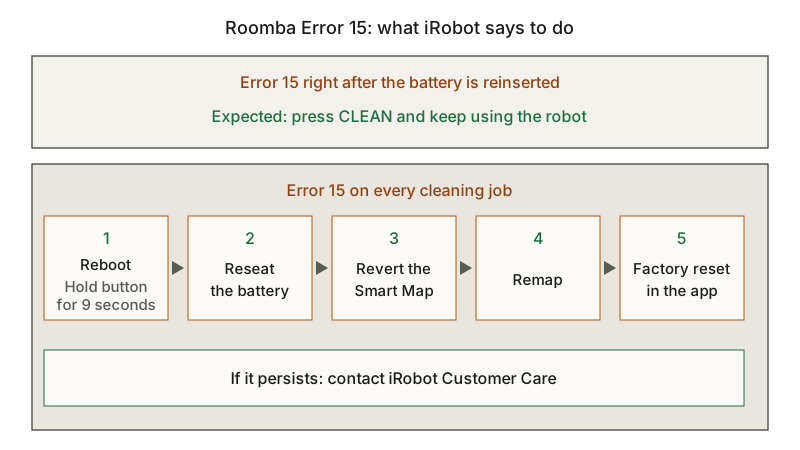
What does Roomba Error 15 mean? iRobot says Error 15 means the robot had an internal error and was able to take care of itself. After the battery is removed and reinserted, the robot signals Error 15 on power up, which iRobot calls expected behavior. If it happens on every cleaning job, iRobot’s article lists a reboot, reseating the battery, reverting or rebuilding the Smart Map and a factory reset in the iRobot HOME app.
What is Roomba Charging Error 5? In iRobot’s charging chart, Charging Errors 4 and 5 mean a low current fault was detected with the dock or the robot. The action given is to clean the charging contacts.
Why does my Roomba say Error 1? On the i and s Series, the left wheel is hanging down or the robot is stuck: place it on a flat surface and press Clean. On the 900 series it can be either wheel; on the 600 series, a side wheel.
Not sure which guide fits? Use the symptom checker
Checked against
Models checked: Roomba i Series (iRobot error chart 19553); Roomba s Series (iRobot error chart 20718); Roomba 900 series (iRobot error chart 9024); Roomba 600 series (iRobot error chart 641); Roomba and Braava jet (iRobot Error 15 article 2466); Roomba j Series and Combo 10 Max (iRobot Error 15 article 31124); Roomba 500-900, e, i, j, s, 100/
- iRobot: The Roomba i Series Error Messages Chart (support; accessed )
- iRobot: The Roomba s Series Error Messages Chart (support; accessed )
- iRobot: The Roomba 900 series error messages chart (support; accessed )
- iRobot: The Roomba 600 series error messages chart (support; accessed )
- iRobot: Roomba: Error 15 (support; accessed )
- iRobot: Error 15, Roomba j Series and Combo 10 Max (support; accessed )
- iRobot: Charging Error Chart: All Roomba and Braava Models (support; accessed )
- iRobot: Charging Error 2: All Roomba and Braava Models (support; accessed )