Shark Robot Vacuum Error Codes: Meanings by Series
Short answer
Shark publishes a separate error list for each robot series, and some numbers change meaning between them: Error 23 is a robot tank empty error on the RV2800 but a cannot return to base error in the RV2900 list. On all three series covered here, Error 2 is a side brush that is not spinning and Error 9 is a dust cup error. Power the robot off, clear the part the code names, and contact Shark support if the error keeps returning.
Clearing a Shark robot error on the RV2700, RV2800 and RV2900 series
-
Check 1
Does the code name a side brush, brushroll, drive wheel, bumper or cliff sensor?
Yes
Power the robot off, clear the part named in your series article, then slide it back onto the base and press VACUUM.
Open guide: Robot Vacuum Brush Not SpinningNo
-
Check 2
Does your RV2700 or RV2800 show Error 9 or 1094?
Yes
Remove the dust cup, clean it and the slot it fits into, then push it back in until it clicks into place.
No
-
Check 3
Does your RV2700 or RV2800 show Error 21 or 1097, a stuck error?
Yes
Move the robot to an open spot no more than 3 feet from where it stopped and resume; if it repeats, restart the mission from the dock.
No
-
Check 4
Does your RV2800 show Error 23, a robot tank empty error?
Yes
Unplug the base, then clean and refill the robot water tank and check that the tank and pad plate tray ports are not clogged.
No
-
Check 5
Does your RV2700 or RV2800 show Error 19 or 1005, a boot-up error?
Yes
Remove the robot from the base, hold POWER for 3 seconds, then place it back on the base to reboot and recharge.
No
None of these?
If the error keeps returning after the steps in your series article, contact Shark support with your model and the error code.
To read a Shark robot error, you need two things: the number and the series of your robot. Shark’s support site keeps a separate error list for each series, such as RV2700, RV2800 or RV2900, and each list names the model numbers it covers, so check yours against it. Some errors carry two numbers in Shark’s articles, such as 9 and 1094 for the RV2700 dust cup error, and both point to the same fix. This guide covers the RV2700, RV2800 and RV2900 series, and every code below links to the Shark page it comes from.
Shark error codes: what each one means and what to do
The meaning column names the series each meaning comes from. The action column repeats the quick fix from the Shark article named in the source column.
| Code | Official meaning, by series | First action named by Shark | Source |
|---|---|---|---|
| Error 2 | RV2700, RV2800 and RV2900: side brush not spinning | Remove the side brush and clear debris on and around it so it moves freely 360 degrees in both directions | RV2700 article, RV2800 article, RV2900 list |
| Error 4 | RV2700 and RV2800: brushroll motor overcurrent. RV2900: brushroll motor error | RV2700: remove and clean the brushroll door and brushroll, clean under the end cap and clear the compartment | RV2700 article, RV2900 list |
| Error 5 | RV2700 and RV2800: wheel overcurrent. RV2900: wheel error | RV2700: clean the wheels, remove debris around the axles and turn both wheels by hand until they spin freely | RV2700 article, RV2900 list |
| Error 6 | All three: bumper error | RV2700: clean the bumper, check that it moves in and out freely, and check the top navigation module | RV2700 article |
| Error 7 | All three: cliff sensor error | RV2700: move the robot and wipe the cliff sensors with a clean, dry cloth | RV2700 article |
| Error 9 | All three: dust cup error (also 1094 on RV2700 and RV2800) | RV2700: remove the dust cup, clean it and its slot, and push it back in until it clicks | RV2700 article |
| Error 17 (1095) | RV2700 and RV2800: battery low | Place the robot on the base by hand to recharge | RV2700 article |
| Error 19 (1005) | RV2700 and RV2800: boot-up error | Remove the robot from the base, hold POWER for 3 seconds, then place it back on the base | RV2700 article |
| Error 21 | RV2700 and RV2800 (also 1097): stuck error. RV2900: boot-up error | RV2700 and RV2800: move the robot to an open spot no more than 3 feet away and resume | RV2700 article, RV2800 article, RV2900 list |
| Error 23 | RV2800: robot tank empty, a problem with the base refilling the robot’s water tank. RV2900: cannot return to base | RV2800: clean and refill the robot water tank and check that the tank and pad plate tray ports are clear | RV2800 article, RV2900 list |
| Error 30 (1089) | RV2700 and RV2800: cannot return to base. RV2900: pad shift error | RV2700: check that the base has power, is free of obstacles and is not in direct sunlight or on carpet | RV2700 article, RV2900 list |
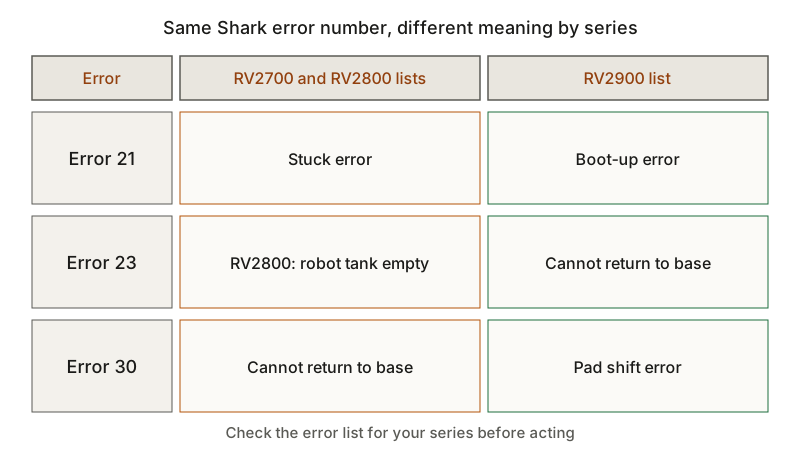
The RV2800 meanings for Errors 4, 5, 6, 7, 9, 17, 19 and 30 come from the RV2800 error list, and the RV2900 meanings from the RV2900 error list.
How to clear a Shark error: step by step
Each step below uses an action from the Shark articles cited in the table. None of them asks you to open the robot or its battery compartment.
- Write down the number and the model. Note every number shown, including a second one such as 1094, and the model number, so you can open the list for your series.
- Power the robot off. The RV2700 brush, wheel, bumper, cliff sensor and dust cup articles start by removing the robot from the base and holding the POWER button for 3 seconds. For an error involving the base’s water system, the RV2800 Error 23 article says to unplug the base power cord before any maintenance.
- Clear the part the code names. Remove hair and debris from the side brush, brushroll or drive wheels, check that the bumper moves freely, or wipe the cliff sensors with a clean, dry cloth, as your series article describes.
- Reseat what the error says is missing. For a dust cup error, push the dust cup back in until it clicks into place.
- Power the robot back on from the base. The RV2700 articles say to slide the robot onto the base with the Shark logo facing upside down, then press VACUUM to start a cleaning mission.
- Stop and contact Shark support if the error keeps returning. The RV2700 articles and the RV2800 Error 23 article end by asking you to contact Shark support with your model and the error code once their steps have failed. As a precaution, stop using a robot that shows visible damage until support has checked it.
What changes by model
Shark RV2700 series (Stratos NEVERTOUCH)
The RV2700 articles cover the RV2710ZE, RV2720ZE, AV2700ZE, RV2871ZEUS, RV2872ZEUS and AV2870ZEUS. Shark’s RV2700 error code index numbers several errors differently from the RV2700 articles it links to: the index lists the stuck error as 16 and the boot-up error as 21, while the articles give 21 and 1097 for the stuck error and 19 and 1005 for the boot-up error. The table follows the articles. The RV2700 side brush article adds that the side brush may not spin on carpet as expected.
Shark RV2800 series (POWERDETECT NeverTouch Base)
The RV2800 list covers the RV2800ZE, RV2820ZE, RV2800YE, RV2820YE, UR2860YS, AV2810YS, UR2850ZE and RV2810ZE, with their listed US and Canadian variants. Its numbers match the RV2700 articles for the stuck, boot-up, battery low and cannot return to base errors. It adds mopping and base codes, including 23 for robot tank empty, 69 for robot tank cannot fill, 48 for a missing pad plate and 58 or 61 for the remove pad plate error.
Shark RV2900 series (POWERDETECT ThermaCharged)
The RV2900 list covers the RV2910XE, RV2920XE, RV2930XE, RV2932XE, AV2900XE, AV2902XE, AV2920XE, AV2922XE and UR2950XE, with their listed US and Canadian variants. Its numbering differs from the RV2800 list: 16 is the stuck error, 21 the boot-up error, 23 cannot return to base, 24 battery low and 8 battery abnormal. Some RV2900 errors have a name but no number, such as Wheel Slip. For that error, the Wheel Slip article says to move the robot to a dry spot no more than 3 feet away, wipe liquid off the wheels with a dry cloth and, if it persists, adjust the water flow level in the SharkClean app.
Related guides
For brush codes, the robot vacuum brush not spinning guide compares brush care across brands, and the robot vacuum sensor error guide covers cliff and bumper sensors. If the robot cannot find its base, see robot vacuum won’t return to dock. For other brands, the robot vacuum error codes guide compares how makers number their errors.
Frequently asked questions
What does Shark robot Error 2 mean? On the RV2700, RV2800 and RV2900 series, Error 2 is a side brush that is not spinning. The RV2700 and RV2800 articles say the side brush is stuck: remove it and clear debris on and around it so it moves freely 360 degrees in both directions.
What does Shark robot Error 9 mean? Error 9 is a dust cup error on all three series. The RV2700 article, which also lists it as 1094, says the dust cup is missing or may not be fully inserted: clean the cup and its slot, then push it back in until it clicks.
Why does my Shark show two numbers for one error? On the RV2700 and RV2800 series, Shark lists some errors under two numbers, such as 21 and 1097 for the stuck error. Both numbers lead to the same article and the same fix.
Not sure which guide fits? Use the symptom checker
Checked against
Models checked: Shark RV2700 series (Stratos NEVERTOUCH): RV2710ZE, RV2720ZE, AV2700ZE, RV2871ZEUS, RV2872ZEUS, AV2870ZEUS; Shark RV2800 series (POWERDETECT NeverTouch Base): RV2800ZE, RV2820ZE, RV2800YE, RV2820YE, UR2860YS, AV2810YS, UR2850ZE, RV2810ZE and listed US/
- SharkNinja: RV2700 Series Shark Stratos NEVERTOUCH Robot Vacuum - Robot Error Codes (support; accessed )
- SharkNinja: RV2700 Series Error Codes - Side Brush Not Spinning Error #2 (support; accessed )
- SharkNinja: RV2700 Series Error Codes - Brushroll Motor Overcurrent Error #4 (support; accessed )
- SharkNinja: RV2700 Series Error Codes - Wheel Overcurrent Error #5 (support; accessed )
- SharkNinja: RV2700 Series Error Codes - Bumper Error #6 (support; accessed )
- SharkNinja: RV2700 Series Error Codes - Cliff Sensor Error #7 (support; accessed )
- SharkNinja: RV2700 Series Error Codes - Dust Cup Error #9, 1094 (support; accessed )
- SharkNinja: RV2700 Series Error Codes - Battery Low Error #17, 1095 (support; accessed )
- SharkNinja: RV2700 Series Error Codes - Boot-Up Error #19, 1005 (support; accessed )
- SharkNinja: RV2700 Series Error Codes - Stuck Error #21, 1097 (support; accessed )
- SharkNinja: RV2700 Series Error Codes - Cannot Return To Base Error #30, 1089 (support; accessed )
- SharkNinja: RV2800 Series Shark POWERDETECT NeverTouch Base Robot Vacuum - Robot Error Codes (support; accessed )
- SharkNinja: RV2800 Series Error Codes - Side Brush Not Spinning Error #2 (support; accessed )
- SharkNinja: RV2800 Series Error Codes - Stuck Error #21, 1097 (support; accessed )
- SharkNinja: RV2800 Series Error Codes - Robot Tank Empty Error #23 (support; accessed )
- SharkNinja: RV2900 Series Shark POWERDETECT ThermaCharged Robot Vacuum - Robot Error Codes (support; accessed )
- SharkNinja: RV2900 Series Error Codes - Wheel Slip Error (support; accessed )