Robot Vacuum Brush Not Spinning? Main and Side Brushes
Short answer
As a precaution, switch off the robot before inspecting the main or side brush, and follow your model's brush-removal instructions to clear tangles. On the Roborock Q5+, Error 5 concerns the main brush and Error 6 the side brush. As a precaution, check the code table for your exact model.
Robot vacuum brush not spinning: main and side brushes
-
Check 1
Does the error read Error 5 or Error 6 on a Roborock Q5+?
Yes
On the Roborock Q5+, Error 5 means a jammed main brush; Error 6 means a jammed side brush.
No
-
Check 2
Is hair or debris wrapped around the brush?
Yes
As a precaution, turn the robot off before touching the underside and follow your model's instructions for removing covers and cleaning the brush.
No
-
Check 3
Does the brush or its guard sit loose, or fail to lock in place?
Yes
As a precaution, switch off and follow your model's fitting steps. For the Q5+, press the main brush cover until it locks.
No
-
Check 4
On an LG robot vacuum, does a side brush screw turn loosely, or will the brush not assemble?
Yes
Have it checked by an LG Electronics service technician, as LG recommends.
No
None of these?
As a precaution, if the brush still stops after following your model's instructions, note the model, error and steps taken, then contact support.
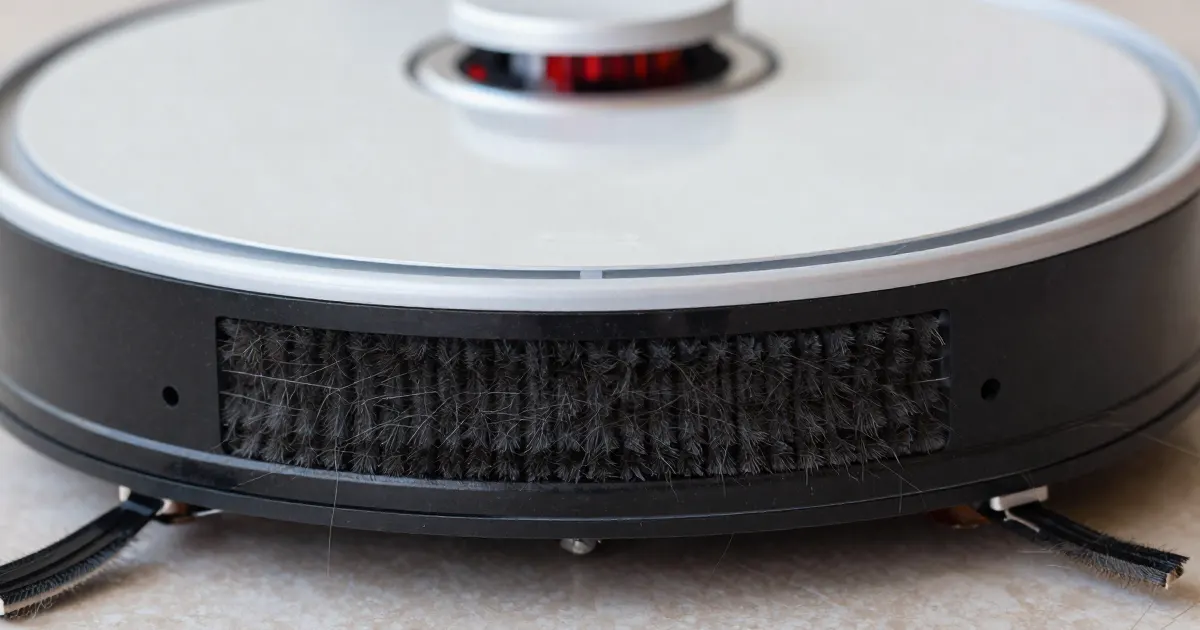
Identify the brush before removing anything
As a precaution, switch the robot off before inspecting its underside, note any error message and identify the affected brush. The main brush is the roller across its intake; a side brush sweeps along an edge. ECOVACS’s FAQ for the DEEBOT OZMO 950 tells owners to power the robot off before turning it over. As a precaution, follow your own model’s manual for removing covers and brushes.
If the brushes turn but the robot picks up nothing, the robot not picking up guide covers suction problems. A wheel code is covered in the robot wheel error guide, and a numbered code in the robot vacuum error codes guide.
Main brush or side brush: the direct answer
The sources below describe cleaning and assembly checks, plus a service referral for an LG side brush. Each entry identifies its source.
- Hair or debris wrapped around the brush. ECOVACS says the main brush and/or side brushes may be tangled with hair or debris on the DEEBOT OZMO 950. On the DEEBOT OZMO T8 AIVI, its FAQ names debris in the main brush, or a main brush that is stuck, as the cause. The Roborock Q5+ manual says to remove hair entangled around the main brush with the main brush cleaning tool.
- A brush or guard that is not seated. The eufy article asks owners to confirm that the roller brush and brush guard are installed correctly. The Q5+ manual says to press the main brush cover until it locks in place, and the LG troubleshooting page ends its steps by firmly pressing the cover until a clicking sound is heard.
- Bearings, brush ends and connectors. The Q5+ manual’s Error 5 entry tells owners to clean the main brush and its bearings, and its steps include pulling out the main brush bearing. The eufy article names both ends of the roller brush and the connectors on the vacuum.
- A fault that needs service. If an LG side brush screw turns loosely, or the brush cannot be assembled or disassembled, LG’s side brush page recommends having it checked by an LG Electronics service technician.
What changes by model
Each row reflects the documentation and model scope identified in its source. As a precaution, use the instructions and error-code table for your exact model.
Main brush steps by brand
| Brand and model | Main brush steps in its own documentation | Source |
|---|---|---|
| Roborock Q5+ | Turn the robot over, press the latches to remove the main brush cover, pull out the main brush and its bearing, remove hair with the cleaning tool, reinstall, then press the cover to lock it in place. Error 5 means the main brush is jammed. | Q5+ manual |
| eufy RoboVac (article names the Bounce, LR30, L35, L50, L60, G, X8 and X8 Pro series) | Turn the RoboVac over, remove the roller brush and brush guard, clean the brush with attention to its two ends and the connectors on the vacuum, confirm the brush and guard are seated, and try a spare roller brush if you have one. | eufy article |
| ECOVACS DEEBOT OZMO 950 | Power off and turn the robot over. Push the two tabs on the Main Brush Cover to remove it, cut away hair with the Cleaning Tool, rinse the brush if needed, and dry it completely before reinstalling. | ECOVACS FAQ |
| ECOVACS DEEBOT OZMO T8 AIVI | Remove and clean the main brush, reattach it, then use the robot as normal. If the problem persists, contact ECOVACS Customer Service. | ECOVACS FAQ |
| LG robot vacuum (page states it was created for all models) | Remove the dust bin before cleaning the rotating brush. Place the robot upside down on a soft cloth, press the Separate button, press the lever while lifting the brush out, remove hair and debris, and press the cover until it clicks. | LG troubleshooting page |
Removing the dust bin before cleaning the brush, as LG’s page instructs, keeps internal dust from falling out. ECOVACS’s DEEBOT OZMO 950 steps add that the main brush should be dried completely before it goes back in.
Side brush steps by brand
| Brand and model | Side brush steps in its own documentation | Source |
|---|---|---|
| Roborock Q5+ | Clean the side brush monthly and replace it every 3-6 months. Unscrew the side brush screw, remove and clean the brush, reinstall it and tighten the screw. | Q5+ manual |
| ECOVACS DEEBOT OZMO 950 | Take the side brushes off, wipe the brushes and their slots with a dry cloth, then reattach them. | ECOVACS FAQ |
| LG robot vacuum (page states it was created for all models) | With a cross-head screwdriver, turn the center screws counterclockwise, pull the brush off, remove foreign objects with a cleaning brush, wash it in lukewarm water, then turn the screws clockwise to reassemble. | LG side brush page |
The LG page says the left and right side brushes have assembly units of different shapes, so check the L/R sign on each brush before installing it.
Roborock Q5+
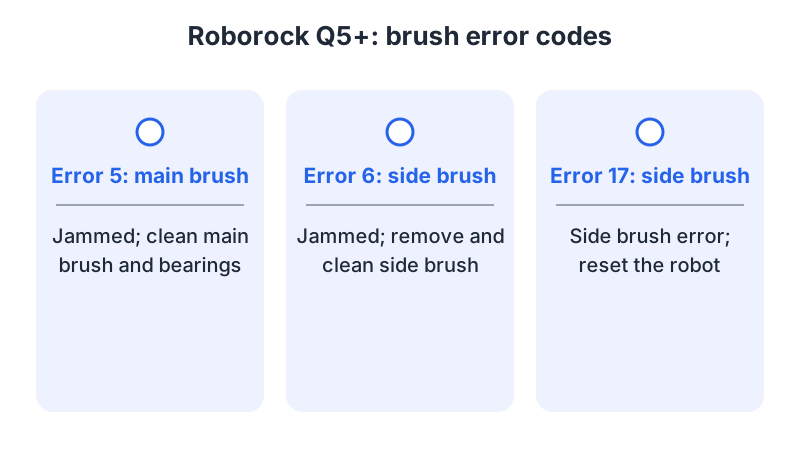
For the Roborock Q5+, the manual identifies Error 5 as a jammed main brush and instructs owners to clean the brush and bearings. For Error 6, a jammed side brush, it instructs owners to remove and clean the side brush. For Error 17, a side brush error, it instructs owners to reset the robot.
The manual’s routine maintenance gives the main brush a cleaning every 2 weeks and a replacement every 6-12 months, and the side brush a monthly cleaning with a replacement every 3-6 months. For hair, the manual says that if there is a large amount, or the hair is tightly entangled, it should be removed carefully to avoid damage to the main brush, and that the cleaning tool should be used carefully to avoid injury.
As a precaution, other Roborock models may use other codes, so read the code table in the manual for your exact model before acting on a number.
eufy RoboVac
The eufy article groups its models by drop-sensor count: 3 drop sensors for the Bounce, LR30, L35, L50 and L60 series, and 4 drop sensors for the G, X8 and X8 Pro series. Its procedure includes a test with the brush off. Flip the vacuum over, remove the roller brush and brush guard, and cover the drop sensors with white paper. Press Start, then check whether the white square connector on the vacuum rotates.
If the problem continues, eufy asks owners to contact support with photos of both ends of the roller brush and both connectors on the vacuum.
ECOVACS DEEBOT
Each ECOVACS FAQ names its own model. The DEEBOT OZMO 950 page gives steps for the main brush cover, the Cleaning Tool and the side brushes. The DEEBOT OZMO T8 AIVI page gives a shorter procedure: remove and clean the main brush, reattach it, and contact ECOVACS Customer Service if the problem persists. As a precaution, use the page for the model printed on your robot.
LG robot vacuum
LG’s pages state that they were created for all models, so the images and content may differ from your product. The rotating brush troubleshooting page says stuck debris can be loosened by hand or removed with scissors. The side brush page says a loose screw, or a brush that cannot be assembled or disassembled, goes to an LG Electronics service technician.
Check the result and contact support
As a precaution, follow your model’s instructions to check brush operation after cleaning and reassembly. The eufy article’s test is the brush-off check described above: with the vacuum flipped and the drop sensors covered, press Start and look at the connector.
As a precaution, write down the model, the error and the brush affected before contacting support. Roborock’s Q5+ manual says that if the problem persists after the steps in its table, owners should contact its support team at support@roborock.com for the United States, Canada and non-Europe regions, 1-855-960-4321 for the United States, or 1-833-421-1915 for Canada.
Frequently asked questions
Does Error 5 mean the same thing on every robot? For the Roborock Q5+, Error 5 means a jammed main brush; the manual instructs owners to clean the brush and bearings. Error 6 means a jammed side brush. As a precaution, consult your own model’s code table before acting on a number.
Should I remove the dust bin before cleaning the main brush? LG’s troubleshooting page says to remove the dust bin before cleaning the rotating brush, so that internal dust does not fall out when the brush is removed.
Can I cut tangled hair with scissors? LG’s troubleshooting page says stuck debris can be removed with scissors. The Q5+ manual says to use the main brush cleaning tool carefully to avoid injury, and to remove tightly entangled hair with care so the main brush is not damaged. For the DEEBOT OZMO 950, ECOVACS’s FAQ instructs owners to use the Cleaning Tool to cut hair off the main brush.
For other robot symptoms, start with the robot vacuum troubleshooting hub. For a corded upright brush, see the separate vacuum brush-roll guide.
Not sure which guide fits? Use the symptom checker
Checked against
Models checked: Roborock Q5+ user manual (PDF); eufy RoboVac roller brush article (drop-sensor series named); ECOVACS DEEBOT OZMO 950 FAQ; ECOVACS DEEBOT OZMO T8 AIVI FAQ; LG robot vacuum rotating brush pages (all models). These are document checks, not hands-on tests.
- Roborock Q5+ User Manual (manual; accessed )
- eufy: What should I do if RoboVac's roller brush does not rotate? (support; accessed )
- ECOVACS: Why aren't the Main Brush and/or Side Brushes rotating when DEEBOT is cleaning? (DEEBOT OZMO 950) (support; accessed )
- ECOVACS: Main brush does not rotate (DEEBOT OZMO T8 AIVI) (support; accessed )
- LG Robot Vacuum: How to Clean the Rotating Brush (support; accessed )
- LG Robot Vacuum: Troubleshooting the 'Remove Foreign Objects From the Rotating Brush' Voice Message (support; accessed )