Robot Vacuum Spinning in Circles? Record Error and Location
Short answer
Record the exact error, circling direction and location, then follow your model’s instructions. As a precaution, power off before handling parts, keep cliff protection active and ask support to confirm the diagnosis before replacing a wheel.
Short answer
For eufy RoboVac Bounce models, the circling article points to the bumper or a wheel. For DEEBOT circling and moving backward after startup, ECOVACS also lists dusty anti-drop sensors. Record the code, direction and location, then follow the instructions for your model. As a precaution, power off before handling parts.
Record the code and location first
If your Q5+ reports an error while circling, match it to the Q340RR manual; use the wheel-error guide or sensor-error guide for the relevant fault, matching the model in each entry.
Write down where the robot was when it circled: an open floor, one obstacle, a doorway or an edge. As a precaution, keep it away from stairs and fragile objects while you investigate.
Check the bumper and the wheels
For RoboVac Bounce models, the eufy support article links circling to a stuck bumper or wheel. For spinning in one direction, it recommends cleaning the wheels, checking that they flex and spring back, and comparing them. For the bumper, it recommends dislodging debris, checking that both sides sit evenly, and wiping the surface with a dry cloth.
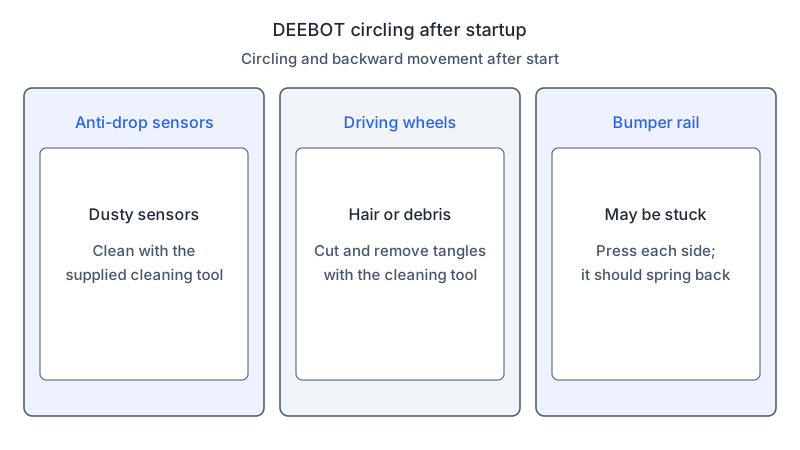
The Ecovacs FAQ covers circling and backward movement after startup. It names a bumper rail that may be stuck: press each side and check that it springs back by itself. If the problem continues, it tells you to contact Ecovacs customer service.
The LG help article covers the case where only one wheel repeatedly moves forward or backward. It asks you to place a soft cloth on the floor, turn the robot upside down on it, remove any foreign matter from the wheels, and rotate the wheels by hand.
Match sensor care to the symptom and model
For an accompanying sensor alert, see the sensor-error guide and match its model-specific instructions to your robot.
For DEEBOT circling and moving backward after startup, the ECOVACS FAQ recommends cleaning dusty anti-drop sensors with the supplied cleaning tool.
Check the driving wheels for tangled debris
For DEEBOT circling and moving backward after startup, the ECOVACS FAQ recommends using the supplied cleaning tool to cut and remove hair or debris tangled around the driving wheels. As a precaution, avoid forcing a wheel.
What changes by model
The table compares what each source gives for circling, wheels and sensors. Each row links to the page it came from, and each brand has its own note below. Do not apply a step from one model to another.
| Brand and model | What the source gives | Source |
|---|---|---|
| Roborock Q5+ (Q340RR) | If an alert accompanies the circling, use the manual’s error table for that code. | Q5+ manual |
| iRobot Roomba 600 series | Routine maintenance for this series’ wheels and cliff sensors. | Roomba 600 maintenance |
| Eufy RoboVac Bounce series | Circling relates to a stuck bumper or a stuck wheel. For a spin in one direction, clean the wheels, check they flex, and compare the suspect wheel with the other. Tap or shake the bumper to dislodge debris and check that it sits evenly. | Eufy support article |
| Ecovacs DEEBOT | After startup, circling and backward movement may come from dust on the anti-drop sensors, hair on the driving wheels, or a stuck bumper rail. | Ecovacs FAQ |
| LG robot vacuum | When only one wheel repeatedly moves forward or backward, remove foreign matter from the wheels and rotate them by hand. Clean the cliff sensor with a cotton ball or soft cloth. | LG help article |
Roborock Q5+
For the Q5+, use the linked Q340RR manual to interpret any accompanying alert, and record where the circling occurs.
iRobot Roomba 600 series
Use the linked Roomba 600 maintenance article for routine care; for a wheel-specific fault, see the wheel-error guide and match the model and error.
Eufy RoboVac Bounce series
The Eufy article is written for the RoboVac Bounce series and links circling to the bumper or a wheel. Its wheel check is a comparison: test the suspect wheel against the other one. Its bumper check looks for debris underneath and for a bumper that sits unevenly on one side.
Ecovacs DEEBOT
The Ecovacs page covers DEEBOT robots that move in circles and backward after startup. Keep its steps to that case. Its three causes are dusty anti-drop sensors, tangled driving wheels and a stuck bumper rail.
LG robot vacuum
For one wheel that repeatedly moves forward or backward, use the linked LG article and the wheel-error guide, matching that specific symptom.
Inspect what the model permits
Follow your model’s method for visible debris around the wheels or bumper. As a precaution, avoid force, disassembly or lubricant beyond what its manual permits.
For your troubleshooting record, note whether circling began after maintenance or occurs at one location, and photograph the surface and obstacle layout.
For support, record the exact code and model, photograph any visible obstruction with the robot off, note the affected location, and list any parts removed during recent maintenance.
Record observations before considering a reset
As a precaution, save the code and location before considering a reset. The Q5+ manual notes that a system reset may help with some problems and resets scheduled cleaning and WiFi settings to factory defaults; follow the instructions for your exact model.
As a precaution, supervise any restart allowed by your model’s instructions after maintenance and reassembly, stop if circling repeats, and keep cliff protection active.
For an unresolved fault, give support the model, code and observations. As a precaution, ask support to confirm the diagnosis before ordering replacement parts. If wheel or sensor symptoms persist, use the wheel-error guide or sensor-error guide, matching the model in each entry. See mapping problems for incorrect room plans and stuck robots for physical traps.
FAQ
Which code points to the wheels?
For a wheel-related alert, use the wheel-error guide and match the exact model and code.
Can I use a damp cloth on the cliff sensors?
Use the cleaning material specified for your model and sensor; see the sensor-error guide and match the model in each entry.
Should I reset the robot to stop the circling?
As a precaution, record the code and location first, then follow the reset guidance for your exact model.
Not sure which guide fits? Use the symptom checker
Checked against
Models checked: Roborock Q5+; iRobot Roomba 600 series; Eufy RoboVac Bounce series; Ecovacs DEEBOT; LG robot vacuum. These are document checks, not hands-on tests.
- Roborock Q5+ manual (Q340RR) (manual; accessed )
- iRobot Roomba 600 maintenance (support; accessed )
- What to do if my RoboVac of Bounce Series spins in circles (support; accessed )
- Why does DEEBOT move around in circles and backwards after starting up? (support; accessed )
- LG robot vacuum troubleshooting: remove foreign objects at the left/right wheels (support; accessed )