Robot Vacuum Smells Bad? Check the Bin, Filter and Dock
Short answer
For odor troubleshooting, follow eufy S1 Pro dustbin guidance or ECOVACS auto-empty station bag guidance for your model. Samsung's Jet Bot AI+ page covers filter maintenance. As a precaution, stop using and charging the robot if it smells burnt or electrical or emits smoke; follow the [burning-smell guide](/guides/robot-vacuum-burning-smell/).
Robot vacuum smells bad: match the part to your model
-
Check 1
Does the smell come with smoke, a burnt odor or an electrical smell?
Yes
As a precaution, stop using and charging the robot, and follow the burning-smell guide.
Open the guideNo
-
Check 2
Does your eufy S1 Pro have a dusty or damp dustbin or dustbin filter?
Yes
Remove the bin, brush the dustbin and high-performance filters, clean the bin interior, and let the bin dry completely before refitting.
No
-
Check 3
Is the filter of your Samsung Jet Bot AI+ dirty?
Yes
Rinse its filters under running water and dry them in a shaded, ventilated place until completely dry. Never wash the Clean Station fine dust filter with water.
No
-
Check 4
Is the disposable dust bag of your ECOVACS T8 auto-empty station full or old?
Yes
Replace the disposable dust bag, which ECOVACS recommends doing regularly.
No
-
Check 5
On your eufy E28 vacuum-and-mop robot, is the dirty water tank unemptied or the roller mop still damp?
Yes
For the E28's mopping system, empty and maintain the dirty water tank, clear tank blockages, and ensure the roller mop is completely dry.
No
None of these?
As a precaution, if odor persists after model-specific cleaning and drying, contact the manufacturer with your model number and the steps tried.
Short answer
The eufy, ECOVACS and LG odor pages below discuss dustbins, filters, station dust bags or mopping components, depending on the model. The Samsung and BISSELL pages provide routine bin and filter maintenance instructions. Cleaning and drying requirements depend on the part and model. As a precaution, stop using and charging the robot if there is a burnt or electrical smell, smoke or unusual heat, and follow the burning-smell guide.
Stop first for a burnt or electrical smell
As a precaution, switch the robot off and stop charging it before you clean anything if the odor is burnt, sharp or electrical, or if smoke or heat comes with it. The cleaning steps in this guide concern dust and moisture odors. As a precaution, do not resume use after a burnt or electrical smell on the basis of these cleaning steps. The burning-smell guide covers that case.
What changes by model
The table summarizes odor troubleshooting from eufy, ECOVACS and LG, and routine bin or filter maintenance from Samsung and BISSELL. Each row concerns the part and model named. LG says its guide was created for all models and that its content may differ from your product.
| Brand and part | Odor troubleshooting or routine maintenance | Source |
|---|---|---|
| eufy E28 vacuum-and-mop robot | Check the dirty water tank and dustbin for blockages and clean them if blocked; an unemptied dirty water tank may ferment; keep the roller mop completely dry | eufy E28 page |
| eufy S1 Pro dustbin | Brush both sides of the dustbin filter and the high-performance filter; clean the inside of the dustbin; dry it completely before refitting | eufy S1 Pro page |
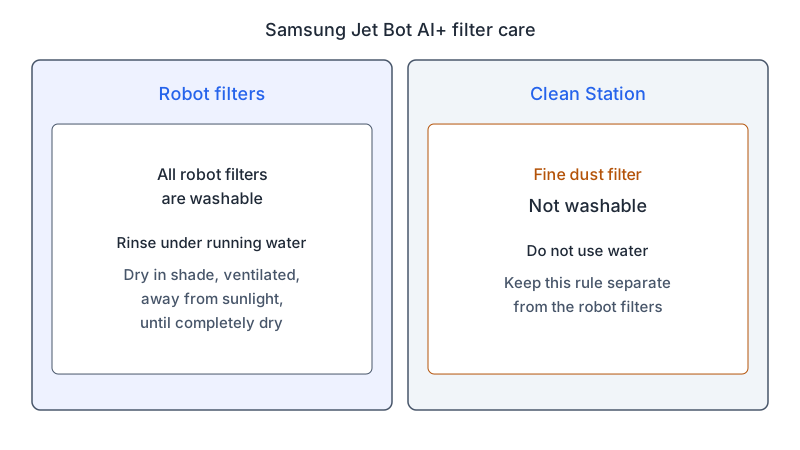
| Samsung Jet Bot AI+ filters | Rinse the filters under running water; dry them in a well-ventilated shaded area, away from direct sunlight, until completely dry | Samsung filter page |
| Samsung Clean Station fine dust filter | Not washable; do not use water on it | Samsung filter page |
| ECOVACS T8 auto-empty station | Some garbage smell is expelled during emptying and does not affect normal operation; damp conditions and long storage can make the bag moldy and smell; replace an overfull bag | ECOVACS FAQ |
| LG robot vacuum (guide for all models) | A full or moist dust bin, or a clogged nozzle or filter, can smell; dry the dust bin and filters in shade for more than 24 hours; do not wash the robot’s inner area with water | LG odor guide |
| BISSELL CleanView Connect 2933 and 3110 | Brush the filter cover and filters with the cleaning tool, since the filters are not washable; rinse the dirt bin only if it then air dries for 24 to 48 hours | BISSELL filter page |
The rules for filters conflict between brands. Samsung’s Jet Bot AI+ filters are rinsed, while BISSELL’s CleanView Connect filters are brushed because they are not washable. As a precaution, follow the cleaning instructions for your exact model.
eufy
eufy has two odor pages. The E28 page covers the vacuum-and-mop robot, and its title names the E25/E28. The S1 Pro page directs owners to remove the dustbin from the robot, brush both sides of the dustbin filter and the high-performance filter with cleaning tools, and clean the inside of the dustbin thoroughly. It also says the dustbin must be completely dry before it goes back into the robot. The S1 Pro page says the dirty water tank can be dried with a dry cloth or air-dried before it is reinstalled.
The E28 page says a dirty water tank left unemptied for an extended period can ferment and cause unpleasant odors. It also says the roller mop should be completely dry. If the robot has come into contact with pet waste, the page says to soak the roller mop in a cleaning solution and clean it by hand. eufy recommends a suitable eufy cleaning solution to avoid odor development and reduce maintenance frequency.
The S1 Pro page also covers the base station’s filter tray and dirty water tank. Those parts, and mop-station odors in general, are covered in the mop station guide, so this guide does not repeat them. For hair or debris wrapped around a brush, see the brush-not-spinning guide. Routine dustbin and filter cleaning is set out in how to clean a robot vacuum.
Samsung
Samsung’s support page for the Jet Bot AI+ says all of its filters are washable. The instruction is to rinse them under running water, then place them in a well-ventilated, shaded area away from direct sunlight until they are completely dry.
The Clean Station used with the Jet Bot AI+ is a separate part with its own rule. Its fine dust filter is not washable, and the page says water must not be used on it. As a precaution, keep the robot filter instructions separate from the Clean Station fine dust filter instructions.
ECOVACS
ECOVACS’s FAQ on the auto-empty station covers odor during emptying. It says a small amount of the garbage smell is driven out by the high-power fan, and that this does not affect normal operation. The FAQ names the T8 in its emptying answers.
The same FAQ says that garbage collected in the dust bag can become moldy and blacken over a long period in a damp environment. It recommends replacing the disposable dust bag regularly, and says an overfull bag should be replaced.
LG
LG’s robot vacuum odor guide lists moisture, a full dust bin and nozzle or filter blockages among the possible causes. It advises drying the dust bin in the shade for more than 24 hours. Filters should also be dried for more than 24 hours in shade, away from direct sunlight. The guide warns that a filter washed in water can smell unless it is dried completely.
For dust in the prefilter or exhaust filter, LG says a vacuum cleaner can remove it, or the filter can be washed in flowing water and then dried for more than 24 hours. The guide says to replace the prefilter when it is damaged. It also warns against washing the robot’s inner area with water.
BISSELL
BISSELL’s guide for the CleanView Connect, which names models 2933 and 3110, says to use the cleaning tool to brush the filter cover and the filters. It states the filters are not washable. The dirt bin can be rinsed, but it must completely air dry for 24 to 48 hours before it goes back in. To empty it, press the button on top of the bin and pull the bin out.
Drying before you refit
The drying rules come from each brand’s page, and they differ. eufy requires the S1 Pro dustbin to be completely dry before refitting. Samsung says to dry the Jet Bot AI+ filters until completely dry in a shaded, ventilated place away from direct sunlight. LG gives more than 24 hours in shade for the dust bin and filters. BISSELL gives 24 to 48 hours for the dirt bin after rinsing.
When the smell continues
As a precaution, if the odor remains after you have followed the steps for your model, stop trying new cleaners and contact the manufacturer with the model number, the part you cleaned, the drying time you allowed and the products you used. As a precaution, if the smell turns burnt or electrical, stop using and charging the robot and follow the burning-smell guide.
Frequently asked questions
Can I rinse the Clean Station fine dust filter?
No. Samsung’s page for the Jet Bot AI+ Clean Station says the fine dust filter is not washable and that water must not be used on it. The robot’s own filters are a separate part with a separate rule.
How long should a dustbin dry?
eufy’s S1 Pro page says the dustbin must be completely dry before it goes back into the robot. For other brands, LG gives more than 24 hours in the shade for the dust bin, and BISSELL gives 24 to 48 hours for its dirt bin after rinsing.
Should I replace the ECOVACS dust bag?
Replace it when it is overfull. ECOVACS’s FAQ for its auto-empty station also recommends replacing the disposable bag regularly, and says that garbage left in a damp bag for a long period can become moldy and smell.
Not sure which guide fits? Use the symptom checker
Checked against
Models checked: eufy E25/E28; eufy S1 Pro; Samsung Jet Bot AI+ and Clean Station; ECOVACS T8 auto-empty station; LG robot vacuum odor guide; BISSELL CleanView Connect 2933 and 3110. These are document checks, not hands-on tests.
- eufy: What should I do if my E25/E28 robot emits an unpleasant odor during its operation? (support; accessed )
- eufy: What should I do if my S1 Pro emits an unpleasant odor when it is working (support; accessed )
- Samsung: How to clean the filters of the Jet Bot AI+ and Clean Station (support; accessed )
- ECOVACS: Auto-empty station odor FAQ (DEEBOT T8) (support; accessed )
- LG: Robot Vacuum Troubleshooting Odor (support; accessed )
- BISSELL: CleanView Connect robotic vacuum, cleaning filters (support; accessed )