Vacuum Hard to Push on Carpet: Settings by Model
Short answer
The cited sources describe height selectors on Hoover uprights and BISSELL models, suction controls on the Miele HS11 and Dyson vacuum in the UP32 manual, height settings on the Miele SEB 228, and optional blades on listed Hoover H-Free models. As a precaution, match your model to its source before adjusting it.
Vacuum hard to push: the control to check, by model
-
Check 1
Is your Hoover HU71, or the bagged upright in the PU31 manual, hard to push on longer-pile carpet?
Yes
Park the cleaner upright, then select 3 or 4 on the HU71, or 3 on the bagged upright described in the PU31 manual.
No
-
Check 2
Is your BISSELL Velocity Bagged, model 3863 or 6221, hard to push?
Yes
Raise the height adjustment knob on the foot one setting at a time until the vacuum is no longer hard to push.
No
-
Check 3
Is the adjustable floorhead on your Miele HS11 hard to maneuver?
Yes
Reduce the suction power with the suction power selector until the floorhead is easier to maneuver.
No
-
Check 4
Is your SEB 228 SC SoftCarpet hard to push on about 70 oz carpet with head at SC and suction at SC SoftCarpet or medium?
Yes
Set the Electrobrush to 4 or SC+.
No
-
Check 5
Is the Dyson vacuum described in the UP32 manual hard to push on deep-pile carpet?
Yes
Slide the suction control to the left, as the manual describes for deep- to medium-pile carpets.
No
-
Check 6
Is your Hoover H-Free harder to push with its optional floor nozzle blades fitted?
Yes
Disconnect the appliance from the mains, remove the agitator and soft strip, slide out both blades, then refit the brush roll.
No
-
Check 7
Has the brush roll stopped turning?
Yes
Follow the brush-roll guide for the controls and checks that apply to your model.
Open the guideNo
None of these?
As a precaution, if it is still hard to push after the checks for your model, contact the maker with the model number and the settings tried.
Which control changes push effort
The cited manuals and support pages describe four kinds of controls: a carpet selector or foot knob that changes height, a suction control, a height setting on a powered head, and optional nozzle blades. As a precaution, find the control your model’s manual names before you change anything.
Carpet care selectors and foot knobs
Hoover’s HU71 manual, from its UK service site, says that the carpet care control selector “raises and lowers the height of the nozzle.” It says to ensure the cleaner is in the upright (parked) position, then move the selector to the required setting for the carpet type or floor covering. Setting 1 suits short to medium pile carpets, hard wooden floors, wooden floor boards with crevices, and ceramic tiles. Setting 2 suits medium pile carpets, delicate floor coverings such as vinyl or linoleum, and parquet flooring. For settings 3 or 4, the manual says: “For longer pile carpets the motion resistance may increase. Use these intermediate settings to reduce the force required to push the vacuum cleaner.” Setting 5 is for luxury carpet and tool mode.
The Hoover bagged upright manual on the same UK site gives the same park-then-select instruction for its carpet care selector. Its setting 3 covers longer pile carpets, with the same “intermediate settings” wording; setting 4 covers luxury carpet and tool mode. Both Hoover manuals advise against use on loop-pile carpets over 30 mm and refer to the flooring manufacturer’s cleaning instructions.
BISSELL’s Velocity Bagged page, which lists models 3863 and 6221, says that when the vacuum is hard to push, the height adjustment may be set too low. It directs owners to locate the height adjustment knob on the foot and to raise it one setting at a time until the machine is no longer hard to push. The CleanView Bagless page describes a dial on the foot. It says the lowest setting suits low pile carpet or bare floors, a medium setting suits medium pile carpet, and the highest setting suits high pile and most shag carpet. If the vacuum is hard to push, the page says to move to the next highest setting. If the dial is hard to turn, it says to tilt the vacuum back slightly to take the weight off the foot.
Suction power and floorhead controls
Miele’s HS11 canister manual, in its en-US edition, says that the suction power “can be regulated to suit the type of flooring being cleaned.” It states: “Reducing the suction power reduces the amount of effort required to maneuver the floorhead.” For the adjustable floorhead, it advises reducing suction if it seems too high, until the head is easier to maneuver. Its suction power selector is turned manually to the setting required. For a short-term reduction, the manual says: “Open the air inlet valve on the handle far enough to reduce the suction power.” It adds that the floorhead “will be easier to maneuver”, and that it is easy to reduce suction for a short time, for example to prevent rugs or other objects being sucked into the vacuum cleaner.
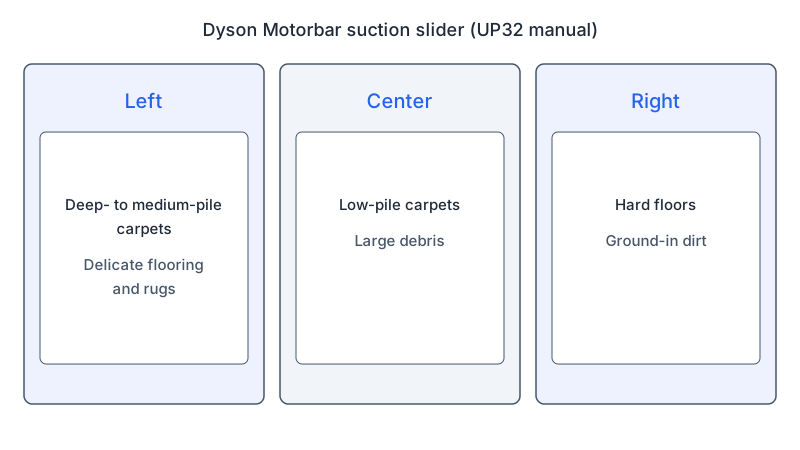
Dyson’s UK vacuum cleaner manual (file UP32) describes a Motorbar head with a motor-driven brush bar and suction control. Its slider positions follow floor type. The manual says: “Position the slider to the left for use on deep- to medium-pile carpets, delicate flooring and rugs.” For low-pile carpets and large debris: “Position the slider in the center for low-pile carpets and large debris.” For hard floors and ground-in dirt: “Position the slider to the right for hard floors and ground-in dirt.” Separately, it says: “Turn off the brush bar for delicate floors or deep pile rugs.”
Powered head height and soft-carpet settings
Miele’s Powerbrush instructions cover the SEB 228 Electro Plus and the SEB 228 Electro SC SoftCarpet. The Electrobrush has five settings for the distance to the floor. Setting 1 is closest to the floor, and setting 5 or SC+ is furthest. The manual says: “Press the foot switch repeatedly until the required setting is reached.”
For the SEB 228 SC SoftCarpet, the manual specifies SC height and SC SoftCarpet suction when available, otherwise a middle suction setting. For carpet around 70 oz face weight, it recommends SC height, then 4 or SC+ if pushing remains difficult. Around 100 oz or higher calls for SC+. The manual warns that raising the head or lowering motor suction could affect carpet cleaning performance. Under “Releasing the connection socket,” it separately says: “If you feel the vacuum is still difficult to push please adjust the setting of the canister to lowest setting.” Its “Recommended use” section advises against using the Electrobrush on deep-pile rugs and carpets.
Optional nozzle blades on the Hoover H-Free
Hoover’s H-Free support page, on its UK site, says the H-Free can take two optional wiper blades for use on some floor coverings. If the cleaner is harder to push on some floor coverings, the page says to remove the blades. Its steps are to disconnect the appliance from the mains, pull the agitator and soft strip up and out, slide both blades out of their two slots, and refit the brush roll. The page lists H-Free models including the HF222RH and HF522PTE, among others.
What changes by model
The table lists each control the manuals and pages name. As a precaution, match your model to a row before you adjust anything. Each row links its source.
| Brand and model | Control the source names | What it says to adjust | Source |
|---|---|---|---|
| Miele SEB 228 SC SoftCarpet | Electrobrush height foot switch and canister setting | Suction: SC SoftCarpet when available; otherwise middle. Height around 70 oz: SC, then 4 or SC+ if difficult; around 100 oz or higher: SC+. Canister to lowest setting if still difficult | Miele Powerbrush manual |
| Miele HS11 canister | Suction power selector and handle air inlet valve | Reduce suction until the floorhead is easier to maneuver; open the handle valve for a short-term reduction | Miele canister manual |
| Hoover HU71 | Carpet care control selector | Park upright, then select; settings 3 or 4 for longer pile carpets | Hoover HU71 manual |
| Hoover bagged upright (PU31 manual) | Carpet care control selector | Park upright, then select; setting 3 for longer pile carpets, setting 4 for luxury carpet and tool mode | Hoover PU31 manual |
| Hoover H-Free models listed on the support page | Optional floor nozzle blades | Remove the blades if harder to push on some floor coverings; disconnect from the mains before any work | Hoover H-Free support page |
| Dyson vacuum in the UP32 manual (Motorbar head) | Suction slider on the cleaner head | Left for deep to medium pile and rugs; center for low pile and large debris; right for hard floors and ground-in dirt | Dyson user manual |
| BISSELL Velocity Bagged (models 3863 and 6221) | Height adjustment knob on the foot | Raise one setting at a time until no longer hard to push | BISSELL support page |
| BISSELL CleanView Bagless | Height dial on the foot | Lowest setting for low pile carpet or bare floors; next highest if hard to push | BISSELL support page |
Miele
Miele’s two manuals are en-US editions and cover different machines. The SEB 228 manual covers the Electrobrush height settings and the SoftCarpet cases. The HS11 canister manual covers suction power and the handle valve. The SEB 228 also specifies canister suction settings for soft carpeting.
Hoover
Hoover’s pages come from its UK service site. The HU71 manual and the bagged upright manual use a carpet care selector on the nozzle that changes its height. The H-Free support page covers two optional blades, and its removal steps apply when the cleaner is harder to push on some floor coverings.
Dyson
Dyson’s UK manual describes a suction slider on the Motorbar cleaner head, set by floor type.
BISSELL
BISSELL’s two support pages describe a knob or dial on the foot. The Velocity Bagged page names models 3863 and 6221. The other page covers the CleanView Bagless line.
Precautions for brush maintenance
The H-Free page says to disconnect the appliance from the mains before examining it. As a precaution, switch off and unplug the cleaner before brush maintenance, and keep the motor housing and casing closed.
FAQ
Which suction control does the Miele HS11 use?
The HS11 manual describes a suction power selector that is turned manually to the setting required. It also describes an air inlet valve on the handle for a short-term reduction in suction.
Can height or suction settings affect cleaning with the Miele SEB 228?
Yes, according to the Miele SEB 228 manual. It warns that a higher Electrobrush setting, or a lower motor suction setting, could affect the cleaning performance of the vacuum on carpet.
What if the brush roll has stopped turning?
The brush roll guide covers a stopped brush roll. For suction complaints, see the no-suction guide. As a precaution, if the vacuum is still hard to push after these checks, contact the maker with the model number and the settings tried.
Not sure which guide fits? Use the symptom checker
Checked against
Models checked: Hoover HU71 user manual (UK service site, file hu71-hu02); Hoover bagged upright user manual (UK service site, file pu31en01-en02); Hoover H-Free support page on the optional floor nozzle blades (UK service site); Miele SEB 228 Electro Plus and SEB 228 Electro SC SoftCarpet operating instructions (en-US Powerbrush manual); Miele HS11 canister vacuum cleaner operating instructions (en-US, M.-Nr. 11 787 241); Dyson UP32 user manual (UK, Motorbar cleaner head); BISSELL Velocity Bagged (models 3863 and 6221) hard-to-push support page; BISSELL CleanView Bagless difficult-to-push support page. These are document checks, not hands-on tests.
- Hoover: user manual, file hu71-hu02 (UK service site) (manual; accessed )
- Hoover: bagged upright user manual (file pu31en01-en02) (manual; accessed )
- Hoover: why is my Hoover H-Free difficult to push? (remove the optional floor nozzle blades) (support; accessed )
- Miele: Powerbrush operating instructions (SEB 228, en-US) (manual; accessed )
- Miele: Canister vacuum cleaner operating instructions (en-US, M.-Nr. 11 787 241) (manual; accessed )
- Dyson: UP32 user manual (manual; accessed )
- BISSELL: My Velocity/PowerGlide Rewind Bagged Vacuum is hard to push (support; accessed )
- BISSELL: Difficult to Push (CleanView Bagless) (support; accessed )